
This is some example code from my introductory talk on Parallelisation. Showing the difference between a standard sequential for loop and its parallel equivalent.
Code example 1: Serial processing of a for loop
class Program
{
    private static Random rnd = new Random();

    static void Main(string[] args)
    {
        DateTime start = DateTime.UtcNow;

        for (int i = 0; i < 20; i++)
            ProcessLoop(i);

        DateTime end = DateTime.UtcNow;
        TimeSpan duration = end - start;

        Console.WriteLine("Finished. Took {0}", duration);
    }

    private static void ProcessLoop(long i)
    {
        Console.WriteLine("Processing index {0}", i);

        // Simulate similar but slightly variable length processing
        int pause = rnd.Next(900, 1000);
        Thread.Sleep(pause);
    }
}
The output of the above code may look something like this:
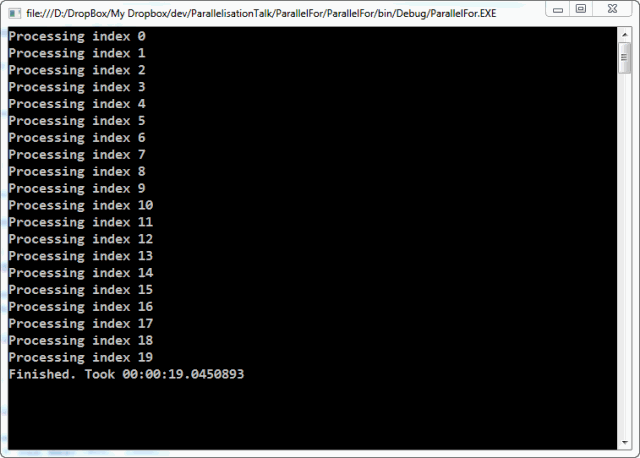
As you can see this takes just shy of 20 seconds to process 20 items.
Code Example 2: Parallel processing of a for loop
The Parallel class can be found in the System.Threading.Tasks namespace.
class Program
{
    private static Random rnd = new Random();

    static void Main(string[] args)
    {
        DateTime start = DateTime.UtcNow;

        Parallel.For(0, 20,
            (i) => ProcessLoop(i));

        DateTime end = DateTime.UtcNow;
        TimeSpan duration = end - start;

        Console.WriteLine("Finished. Took {0}", duration);

        Console.ReadLine();
    }

    private static void ProcessLoop(long i)
    {
        Console.WriteLine("Processing index {0}", i);

        // Simulate similar but slightly variable length processing
        int pause = rnd.Next(900, 1000);
        Thread.Sleep(pause);
    }
}
The output of the above code may look something like this:
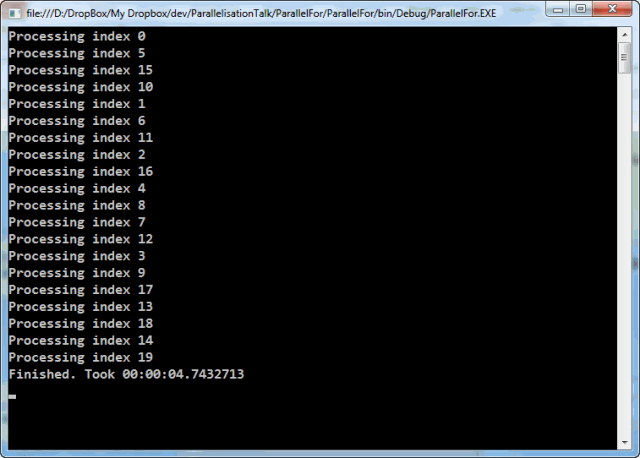
The result of this code is that it takes just shy of 5 second to process the 20 items. I have a 4 core processor so it would be in line with the expectation that the work is distributed across all 4 cores.
 The Blog of Colin Mackay
4 Comments