Introduction
A lot has been written on the subject of test driven development, and especially on the idea that tests ought to be written first. This is an ideal that I strive for, however, I have a tendency to write the unit tests afterwards.
Some people learn better by example. This article, rather than going in to great length about the principles of test driven development, will walk the reader through the process of building and testing an algorithm by writing the tests first, then changing the method being tested so that it fulfils the tests.
The final code and all the unit tests can be found in the accompanying download. This will require NUnit and Visual Studio 2005.
The specimen problem
I once saw a demo of how to create unit tests up front for a simple method. The method took a positive integer and turned it into roman numerals. So, I’m going to do something similar. I’m going to take an integer and turn it into words, in English. The rules for this may change depending on the language, so if English is not your only language, you may like to try to repeat this exercise in another language.
So, if the integer is 1, the result will be "one". If the integer is 23 the result will be "twenty three" and so on. Also note, I’ll be using British or Commonwealth English. So, for 101 the result in words is "one hundred and one". In American English it would be "one hundred one"
The walk through
The algorithm will also be refined through refactoring techniques. Agile development methodologies, especially eXtreme Programming, suggests that you do the simplest thing possible to get the thing working. So, going by this premise, I’ll work on the solution in bits. First, get it to return "one", then "one" or "two" depending on the input, and so on. Once 21 is reached it should become obvious where some refactoring can take place and so on. The final solution will work for 32 bit integers only.
Getting Started
Visual Studio 2005 has some features that can help with writing the tests first. A test can be written that calls into the class under test and the smart tags will prompt you with an offer to create the message stub for you.
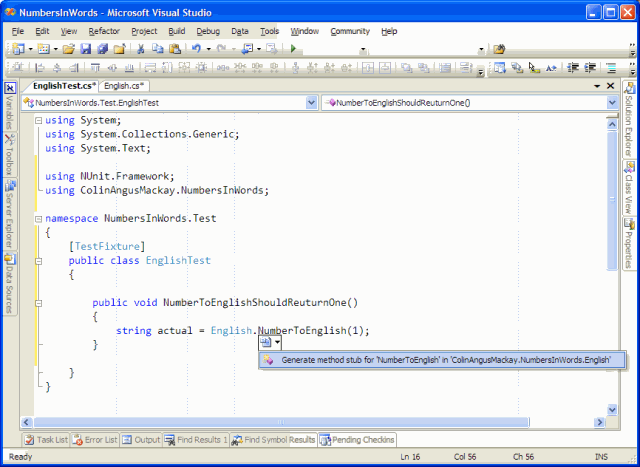
The stub looks like this:
public static string NumberToEnglish(int p)
{
  throw new Exception("The method or operation is not implemented.");
}
If the test is completed to look like this:
[Test]
public void NumberToEnglishShouldReturnOne()
{
  string actual = English.NumberToEnglish(1);
  Assert.AreEqual("one", actual, "Expected the result to be "one"");
}
The test should fail because the stub throws an exception, rather than do what the test expects.
NUnit reports the error like this: "NumbersInWords.Test.EnglishTest.NumberToEnglishShouldReturnOne : System.Exception : The method or operation is not implemented.".
The next thing to do is to ensure that the code satisfies the demands of the unit test. Agile methodologies, such as XP, say that only the simplest change should be made to satisfy the current requirements. In that case the method being tested will be changed to look like this:
public static string NumberToEnglish(int number)
{
  return "one";
}
At this point the unit tests are re-run and they all work out.
Test "two"
Since the overall requirement is that any integer should be translatable into words, the next test should test that 2 can be translated. The test looks like this:
[Test]
public void NumberToEnglishShouldReturnTwo()
{
  string actual = English.NumberToEnglish(2);
  Assert.AreEqual("two", actual, "Expected the result to be "two"");
}
However, since the method being tested returns "one" regardless of input at this point the test fails:
NumbersInWords.Test.EnglishTest.NumberToEnglishShouldReturnTwo :
Expected the result to be "two"
	String lengths are both 3.
	Strings differ at index 0.
	expected: <"two">
	 but was: <"one">
	------------^
Again, keeping with the simplest change principle the code is updated to look like this:
public static string NumberToEnglish(int number)
{
  if (number == 1)
    return "one";
  else
    return "two";
}
The tests now pass.
Test "three" to "twenty"
A third test can now be written. It tests for an input of 3 and an expected return of "three". Naturally, at this point, the test fails. The code is updated again and now looks like this:
public static string NumberToEnglish(int number)
{
  switch (number)
  {
    case 1:
      return "one";
    case 2:
      return "two";
    default:
      return "three";
  }
}
To cut things short the new tests and counter-updates continue like this until the numbers 1 to 20 can be handled. The code will eventually look like this:
public static string NumberToEnglish(int number)
{
  switch (number)
  {
    case 1:
      return "one";
    case 2:
      return "two";
    case 3:
      return "three";
    case 4:
      return "four";
    case 5:
      return "five";
    case 6:
      return "six";
    case 7:
      return "seven";
    case 8:
      return "eight";
    case 9:
      return "nine";
    case 10:
      return "ten";
    case 11:
      return "eleven";
    case 12:
      return "twelve";
    case 13:
      return "thirteen";
    case 14:
      return "fourteen";
    case 15:
      return "fifteen";
    case 16:
      return "sixteen";
    case 17:
      return "seventeen";
    case 18:
      return "eighteen";
    case 19:
      return "nineteen";
    default:
      return "twenty";
  }
}
Test "twenty one" to "twenty nine"
At this point it looks like it will be pretty easy to do 21, but a pattern is about to emerge. After the tests for 21 and 22 have been written, the code is refactored to look like this:
public static string NumberToEnglish(int number)
{
  if (number < 20)
    return TranslateOneToNineteen(number);
  if (number == 20)
    return "twenty";
  return string.Concat("twenty ", TranslateOneToNineteen(number - 20));
}

private static string TranslateOneToNineteen(int number)
{
  switch (number)
  {
    case 1:
      return "one";
    case 2:
      return "two";
    case 3:
      return "three";
    case 4:
      return "four";
    case 5:
      return "five";
    case 6:
      return "six";
    case 7:
      return "seven";
    case 8:
      return "eight";
    case 9:
      return "nine";
    case 10:
      return "ten";
    case 11:
      return "eleven";
    case 12:
      return "twelve";
    case 13:
      return "thirteen";
    case 14:
      return "fourteen";
    case 15:
      return "fifteen";
    case 16:
      return "sixteen";
    case 17:
      return "seventeen";
    case 18:
      return "eighteen";
    default:
      return "nineteen";
  }
}
Now all the tests from 1 to 22 pass. 23 to 29 can be assumed to work because it is using well tested logic.
Test "thirty" to "thirty nine"
30 is a different story. The test will fail like this:
NumbersInWords.Test.EnglishTest.NumberToEnglishShouldReturnThirty :
Expected the result to be "thirty"
	String lengths differ.  Expected length=6, but was length=10.
	Strings differ at index 1.
	expected: <"thirty">
	 but was: <"twenty ten">
	-------------^
By using the principle of doing the simplest thing that will work. The public method changes to:
public static string NumberToEnglish(int number)
{
  if (number < 20)
    return TranslateOneToNineteen(number);
  if (number == 20)
    return "twenty";
  if (number <= 29)
    return string.Concat("twenty ", TranslateOneToNineteen(number - 20));
  return "thirty";
}
Naturally, the test for 31 will fail:
NumbersInWords.Test.EnglishTest.NumberToEnglishShouldReturnThirtyOne :
Expected the result to be "thirty one"
	String lengths differ.  Expected length=10, but was length=6.
	Strings differ at index 6.
	expected: <"thirty one">
	 but was: <"thirty">
	------------------^
So the code is changed again. This time to:
public static string NumberToEnglish(int number)
{
  if (number < 20)
    return TranslateOneToNineteen(number);
  if (number == 20)
    return "twenty";
  if (number <= 29)
    return string.Concat("twenty ", TranslateOneToNineteen(number - 20));
  if (number == 30)
    return "thirty";
  return string.Concat("thirty ", TranslateOneToNineteen(number - 30));
}
Test "forty" to "ninety nine"
A test for 40 will fail:
NumbersInWords.Test.EnglishTest.NumberToEnglishShouldReturnForty :
Expected the result to be "forty"
	String lengths differ.  Expected length=5, but was length=10.
	Strings differ at index 0.
	expected: <"forty">
	 but was: <"thirty ten">
	------------^
The necessary code change starts to draw out a pattern. Of course, the pattern could have been quite easily predicted, but since this code is being built by the simplest change only rule, the pattern has to emerge before it can be acted upon.
The pattern repeats itself until it gets to 99. By this point the public method looks like this:
public static string NumberToEnglish(int number)
{
  if (number < 20)
    return TranslateOneToNineteen(number);
  int units = number % 10;
  int tens = number / 10;
  string result = "";
  switch (tens)
  {
    case 2:
      result = "twenty";
      break;
    case 3:
      result = "thirty";
      break;
    case 4:
      result = "forty";
      break;
    case 5:
      result = "fifty";
      break;
    case 6:
      result = "sixty";
      break;
    case 7:
      result = "seventy";
      break;
    case 8:
      result = "eighty";
      break;
    default:
      result = "ninety";
      break;
  }
  if (units != 0)
    result = string.Concat(result, " ", TranslateOneToNineteen(units));
  return result;
}
Test "one hundred"
The test for 100 will fail. The failure message is:
NumbersInWords.Test.EnglishTest.NumberToEnglishShouldReturnOneHundred :
Expected the result to be "one hundred"
	String lengths differ.  Expected length=11, but was length=6.
	Strings differ at index 0.
	expected: <"one hundred">
	 but was: <"ninety">
	------------^
A quick change to the public method allows the test to pass:
public static string NumberToEnglish(int number)
{
  if (number == 100)
    return "one hundred";

  if (number < 20)
    return TranslateOneToNineteen(number);
  // Remainder omitted for brevity
}
Test "one hundred and one" to "one hundred and ninety nine"
What about 101? That test fails like this:
NumbersInWords.Test.EnglishTest.NumberToEnglishShouldReturnOneHundredAndOne :
Expected the result to be "one hundred and one"
	String lengths differ.  Expected length=19, but was length=10.
	Strings differ at index 0.
	expected: <"one hundred and one">
	 but was: <"ninety one">
	------------^
At this point it should be easy to see that some of the work that has been done previously can be re-used with a small amount of refactoring. First refactor most of the body of the public method into a class called TranslateOneToNinetyNine. Then re-test to ensure that the refactoring process hasn’t introduced any new problems.
In Visual Studio 2005 it is very easy to highlight some code and extract it into a new method, thus allowing it to be reused by being called from multiple places.

Now the public method looks like the following and all previously successful tests continue to be successful
public static string NumberToEnglish(int number)
{
  if (number == 100)
    return "one hundred";

  return TranslateOneToNinetyNine(number);
}
For numbers from 101 to 199 the pattern is "one hundred and X" where X is the result of the translation between 1 and 99. Because it would take too long to write all those tests, it is possible to write just the edge cases and one or two samples from the middle of the range. That should give enough confidence to continue onwards. In this case, the tests are for 101, 115, 155 and 199.
The code is then re-written to support those tests:
public static string NumberToEnglish(int number)
{
  if (number < 100)
    return TranslateOneToNinetyNine(number);
  if (number == 100)
    return "one hundred";

  string result = string.Concat("one hundred and ",
    TranslateOneToNinetyNine(number - 100));

  return result;
}
Test "two hundred"
The next test to write is for 200. Naturally, this test will fail at this point as the code doesn’t support it. The test looks like this:
[Test]
public void NumberToEnglishShouldReturnTwoHundred()
{
    string actual = English.NumberToEnglish(200);
    Assert.AreEqual("two hundred", actual, "Expected the result to be "two hundred"");
}
The failing test can be predicted. It looks like this:
NumbersInWords.Test.EnglishTest.NumberToEnglishShouldReturnTwoHundred :
Expected the result to be "two hundred"
	String lengths differ.  Expected length=11, but was length=22.
	Strings differ at index 0.
	expected: <"two hundred">
	 but was: <"one hundred and ninety">
	------------^
A simple change to the method can get the test passing:
public static string NumberToEnglish(int number)
{
    if (number < 100)
        return TranslateOneToNinetyNine(number);
    if (number == 100)
        return "one hundred";
    if (number == 200)
        return "two hundred";

    string result = string.Concat("one hundred and ",
        TranslateOneToNinetyNine(number - 100));

    return result;
}
Test "two hundred and one" to "two hundred and ninety nine"
Since the next part of the pattern can be seen as very similar to the one hundreds, the two edge cases and a couple of internal cases for the two hundreds are created. Presently, all those tests fail as the method has not been updated to take account of that range of integers.
In order to get those tests working the code is refactored like this:
public static string NumberToEnglish(int number)
{
    if (number < 100)
        return TranslateOneToNinetyNine(number);
    if (number == 100)
        return "one hundred";
    if (number < 200)
        return string.Concat("one hundred and ",
        TranslateOneToNinetyNine(number - 100));
    if (number == 200)
        return "two hundred";

    return string.Concat("two hundred and ",
        TranslateOneToNinetyNine(number - 200));
}
Test "three hundred" to "nine hundred and ninety nine"
From the last change to the method a pattern can be seen to be emerging. The code for dealing with the one hundreds and two hundreds are almost identical. This can be easily changed so that all positive integers between 1 and 999 can be converted into words.
After various unit tests are written to test values from 300 to 999 the code is changed to this:
public static string NumberToEnglish(int number)
{
    if (number < 100)
        return TranslateOneToNinetyNine(number);
    int hundreds = number / 100;
    string result = string.Concat(TranslateOneToNineteen(hundreds),
        " hundred");
    int remainder = number % 100;
    if (remainder == 0)
        return result;

    return string.Concat(result, " and ", TranslateOneToNinetyNine(remainder));
}
Test "one thousand"
As before, the first thing to do is write the test:
[Test]
public void NumberToEnglishShouldReturnOneThousand()
{
    string actual = English.NumberToEnglish(1000);
    Assert.AreEqual("one thousand", actual, "Expected the result to be "one thousand"");
}
Which fails:
NumbersInWords.Test.EnglishTest.NumberToEnglishShouldReturnOneThousand :
Expected the result to be "one thousand"
	String lengths differ.  Expected length=12, but was length=11.
	Strings differ at index 0.
	expected: <"one thousand">
	 but was: <"ten hundred">
	------------^
And the fix:
public static string NumberToEnglish(int number)
{
    if (number == 1000)
        return "one thousand";

    if (number < 100)
        return TranslateOneToNinetyNine(number);
    int hundreds = number / 100;
    string result = string.Concat(TranslateOneToNineteen(hundreds),
        " hundred");
    int remainder = number % 100;
    if (remainder == 0)
        return result;

    return string.Concat(result, " and ", TranslateOneToNinetyNine(remainder));
}
Test "one thousand and one" to "nine thousand nine hundred and ninety nine"
Some forward thinking will reveal that the logic will be similar for the thousands as it was for the hundreds. So, rather than repeat all that in this article, the steps to refactoring the code to work with the range from 101 to 999 can be used similarly with 1001 to 9999. The accompanying download will show all the unit tests.
The final result of this stage is that the public method has been refactored to this:
public static string NumberToEnglish(int number)
{
    if (number < 1000)
        return TranslateOneToNineHundredAndNinetyNine(number);

    int thousands = number / 1000;
    string result = string.Concat(TranslateOneToNineteen(thousands),
        " thousand");
    int remainder = number % 1000;
    if (remainder == 0)
        return result;

    if (remainder < 100)
        return string.Concat(result, " and ",
            TranslateOneToNinetyNine(remainder));

    return string.Concat(result, " ",
        TranslateOneToNineHundredAndNinetyNine(remainder));
}

private static string TranslateOneToNineHundredAndNinetyNine(int number)
{
    if (number < 100)
        return TranslateOneToNinetyNine(number);
    int hundreds = number / 100;
    string result = string.Concat(TranslateOneToNineteen(hundreds),
        " hundred");
    int remainder = number % 100;
    if (remainder == 0)
        return result;

    return string.Concat(result, " and ", TranslateOneToNinetyNine(remainder));
}
Test "ten thousand" to "nine hundred and ninety nine thousand nine hundred and ninety nine"
In the first set of test, that were expected to fail, for the condition that the integer input was a value greater than 9999 actually shows passing tests. This serendipitous circumstance is caused by the TranslateOneToNineteen method being a compatible match for prefixing the "thousand" for a range up to the 19 thousands. Through this code reuse it is possible to get a full range match all the way up to 999999 with only a change to a part of one line of code.
The public method has now changed to:
public static string NumberToEnglish(int number)
{
    if (number < 1000)
        return TranslateOneToNineHundredAndNinetyNine(number);

    int thousands = number / 1000;
    string result = string.Concat(TranslateOneToNineHundredAndNinetyNine(thousands),
        " thousand");
    int remainder = number % 1000;
    if (remainder == 0)
        return result;

    if (remainder < 100)
        return string.Concat(result, " and ",
            TranslateOneToNinetyNine(remainder));

    return string.Concat(result, " ",
        TranslateOneToNineHundredAndNinetyNine(remainder));
}
Test "one million" to "nine hundred and ninety nine million nine hundred and ninety nine thousand nine hundred and ninety nine"
The way the code changes as the number of digits increases should becoming more apparent by now. The amount of code reuse is increasing. The number of necessary tests is decreasing. Confidence is increasing
At the start the first 20 numbers each had their own test. 100% of inputs had a test. From 20 to 99 it was 20 tests. Only 25% of the inputs had tests. From 100 to 999 there were 18 tests. Just 2% of the inputs had tests. From 1000 to 999999 there were, again, just 18 tests. This represents just 2 thousandths of one percent.
At this point the public method has been refactored to look like this:
public class English
{
public static string NumberToEnglish(int number)
{
    if (number < 1000000)
        return TranslateOneToNineHundredAndNinetyNineThousandNineHundredAndNinetyNine(number);

    int millions = number / 1000000;
    string result = string.Concat(TranslateOneToNineHundredAndNinetyNine(millions),
        " million");
    int remainder = number % 1000000;
    if (remainder == 0)
        return result;

    if (remainder < 100)
        return string.Concat(result, " and ",
            TranslateOneToNinetyNine(remainder));

    return string.Concat(result, " ",
        TranslateOneToNineHundredAndNinetyNineThousandNineHundredAndNinetyNine(remainder));
}

private static string TranslateOneToNineHundredAndNinetyNineThousandNineHundredAndNinetyNine(int number)
{
    if (number < 1000)
        return TranslateOneToNineHundredAndNinetyNine(number);

    int thousands = number / 1000;
    string result = string.Concat(TranslateOneToNineHundredAndNinetyNine(thousands),
        " thousand");
    int remainder = number % 1000;
    if (remainder == 0)
        return result;

    if (remainder < 100)
        return string.Concat(result, " and ",
            TranslateOneToNinetyNine(remainder));

    return string.Concat(result, " ",
        TranslateOneToNineHundredAndNinetyNine(remainder));
}
Test "one billion" upwards
The limitations of an integer (Int32) mean that this section reaches the upper limits of 2147483647. Unless an Int64 is used there is no continuation to the trillion range.
Final stages
To this point all positive integers are successfully being translated from an integer into a string of words. At this point, through code reuse, it should be a fairly simple matter to refactor the code to work with negative numbers and zero.
Zero is easy enough. The unit test is put in place:
[Test]
public void NumberToEnglishShouldReturnZero()
{
  string actual = English.NumberToEnglish(0);
  Assert.AreEqual("zero", actual, "Expected the result to be "zero"");
}
And it promptly fails because there is no code to support it. The public method is changed so that it does a quick check at the start:
public static string NumberToEnglish(int number)
{
  if (number == 0)
      return "zero";
  if (number < 1000000000)
      return TranslateOneToNineHundredAndNintyNineMillion...(number);

  int billions = number / 1000000000;
  string result = string.Concat(TranslateOneToNineteen(billions), " billion");

  int remainder = number % 1000000000;
  if (remainder == 0)
    return result;

  if (remainder < 100)
    return string.Concat(result, " and ", TranslateOneToNinetyNine(remainder));

  return string.Concat(result, " ",
    TranslateOneToNineHundredAndNintyNineMillion...(remainder));
}
Now the test passes. Next is to permit negative numbers.
[Test]
public void NumberToEnglishShouldReturnNegativeOne()
{
  string actual = English.NumberToEnglish(-1);
  Assert.AreEqual("negative one", actual, "Expected the result to be "negative one"");
}
This fails so the code is refactored to this:
public static string NumberToEnglish(int number)
{
  if (number == 0)
    return "zero";

  string result = "";
  if (number < 0)
    result = "negative ";

  int absNumber = Math.Abs(number);

  return string.Concat(result,
    TranslateOneToTwoBillion...SixHundredAndFortySeven(absNumber));
  // Method call above contracted for brevity
}
And the test passes. But what about that final edge case? int.MinValue? The test is written but it fails. The reason is thatMath.Abs(int.MinValue) isn’t possible. So, as this is a one off case, the easiest solution is to put in a special case into the public method:
// Special case for int.MinValue.
if (number == int.MinValue)
  return "negative two billion one hundred and forty seven million " +
    "four hundred and eighty three thousand six hundred and forty eight";
Conclusion
This article demonstrates how to unit test and build a piece of code in small increments. The tests continually prove that the developer is on the right path. As the code is built the constant rerunning of existing tests prove that any new enhancements do not break existing code. If, for any reason, it is later found that the code contains a bug, a test can easily be created that exercises that incorrect code and a fix produced.
The full final code is available in the associated download along with a set of NUnit tests.
Downloads
You can download the example code for this article here.

 The Blog of Colin Mackay