Friendly error messages with Microsoft Report Viewer Control

For a project I’m working on I’ve got to display data that’s coming from SSRS (SQL Server Reporting Services) on a web page for our users. One of the feedback items from the first round of user testing was that the error messages from the control were not helpful or friendly.

For example, if a user types in a date in an incorrect format the Report Viewer Control would return an error message to the user like this:

The value provided for the report parameter 'pToDate' is not valid for its type. (rsReportParameterTypeMismatch)

The user doesn’t know that “pToDate” is. The nearest possibly alternative on the page reads “To Date” so they could possibly take a good guess, but why risk support calls over something like that? And the “(rsReportParameterTypeMismatch)” is likely to mean even less to a user. Why should they even have to see things like that?

So I set about trying to change that.

In fact the control gives you no way to alter the error messages that it shows. There is a ReportError event that you can subscribe to and indicate you’ve handled the error, but no where to provide a better error message.

With that in mind I thought that what I’d do is create a Label on the page to hold the error message and populate it if an error occurred.  However, I found that while I could get the message to display initially, I could not get it to go away once the user had corrected the error.

What I had was this:

ASPX:

<asp:Label runat="server" ID="ReportErrorMessage" Visible="false"
           CssClass="report-error-message"></asp:Label>
<rsweb:reportviewer runat="server" ID="TheReport"  Font-Names="Verdana"
                    Width="100%" Height="100%" Font-Size="8pt"
                    InteractiveDeviceInfos="(Collection)" ProcessingMode="Remote"
                    InteractivityPostBackMode="AlwaysSynchronous"
                    WaitMessageFont-Names="Verdana" WaitMessageFont-Size="14pt"
                    OnReportError="TheReport_ReportError"
                    OnReportRefresh="TheReport_ReportRefresh">
    <serverreport reportpath="/Path/To/The/Report"
                  reportserverurl="http://the-report-server.com/ReportServer" />
    </rsweb:reportviewer>

C#

protected void TheReport_ReportError(object sender, ReportErrorEventArgs e)
{
  if (e.Exception.Message.Contains("rsReportParameterTypeMismatch"))
    ReportErrorMessage.Text = BuildBadParameterMessage(e);
  else
    ReportErrorMessage.Text = BuildUnknownErrorMessage(e);

  ReportErrorMessage.Visible = true;
  e.Handled = true;
}

protected void TheReport_ReportRefresh(object sender, CancelEventArgs e)
{
  ReportErrorMessage.Visible = false;
  ReportErrorMessage.Text = string.Empty;
}

Somehow or another the initial message was being set, however the changes in TheReport_ReportRefresh were not being applied despite me verifying the code was being run.

I eventually realised that the report viewer control was not performing a full postback, but just a partial postback and that I needed to put the Label control inside an update panel. Like this:

<asp:UpdatePanel runat="server">
    <ContentTemplate>
        <asp:Label runat="server" ID="ReportErrorMessage" Visible="false"
                   CssClass="report-error-message"></asp:Label>
    </ContentTemplate>
</asp:UpdatePanel>

Once I did that the message appeared and disappears correctly.

The slow handclap

… or how not to motivate your staff

In a previous job we had a team meeting each morning at 9:15. The purpose was to go around the team and in almost scrum like fashion tell everyone what you did, what you’re planning to do and anything holding things up. Occasionally it would also allow people to tell others about some useful new technology or way of doing things that may be of benefit to others.

This was great, however one team member occasionally turned up late. Sometimes due to traffic, but often due to a long running medical complaint that had come out of remission. As a result he earned the displeasure of the development team’s manager.

One morning this manager faced with this individual being late once again instructed his team that any time someone arrives into the meeting late they were to receive a slow handclap. A gesture that indicates dissatisfaction or impatience [1].

A few minutes later the late comer arrived and the team started its slow handclap, egged on by a grinning manager. I joined in. However, something was intensely uncomfortable about it.

The next time the late comer arrived mid-meeting the team again started its slow handclap. This time I didn’t join in. And it clicked what had made me so uncomfortable the first time around. A slow handclap is a gesture designed to publically humiliate the person it is aimed against, which was why I felt so uncomfortable about it.

While it might be perfectly acceptable and understandable for a group of people to spontaneously employ a slow handclap against a politician making a speech, say, the Women’s Institute against the then Prime Minister [2], it is most definitely not acceptable for a manager to employ his staff into joining him in a bit of group bullying.

For a group who have less power it can be effective to help redress the balance to some degree. The WI against the PM, for example. However, for it to be employed by someone who already has power against someone who does not, a manager against a junior team member, it is inexcusable.

LINQ query performance

A while ago I was reviewing some code and I came across some code that looked like this

if (corpus.Where(a => a.SomeProperty == someValue).Count() > 0)
{
    // Do Stuff
}

And it got me thinking that it may not be the best way to do this. What is really being asked here is: “Are there any items in the enumerable?” The count is not actually important in this situation. I considered that it would probably be more efficient to write:

if (corpus.Where(a => a.SomeProperty == someValue).Any())
{
    // Do stuff
}

Then I read somewhere (unfortunately, I didn’t note the URL) that for certain situations the .Any() extension method on IEnumerable<T> can be inefficient in certain scenarios. For instance, if concrete type is actually a List<T> which maintains its own Count. In that instance the cost of setting up the Enumerator and calling MoveNext() to determine the existence of at least one element would be more expensive an operation than calling Count on the List<T>.

I was curious about that so I set about working out the relative performance characteristics of a number of the LINQ extension methods. I should note that these were all on LINQ to Objects out of the box so don’t measure how these methods would perform relatively for things like, say, LINQ to SQL.

I tested various scenarios, some where the IEnumerable<T> is a lightweight generator of elements, in this case an Enumerable.Range(…), in other cases I used a List<T> either by a concrete reference or by an reference to the IEnumerable<T> interface.

All timings in this post relate to my desktop machine which is running Windows 7 64bit with 8Gb RAM and an AMD Phenom II X4 955 running at 1.6GHz (which for some unknown reason it won’t run at the full 3.2GHz)

Counting elements

In the first set of tests I counted the number of elements. For the cases where I called the Count property directly on the List<T> and used the Count() extension method on IEnumerable<T> where the concrete type was the List<T> the result was returned in O(1). The LINQ method was 24 times slower.

Where the IEnumerable<T> did not also implement the ICollection<T> interface (as in the case where the values were being generated by Enumerable.Range(…) method) the Count() extension method took O(n) time to return the answer.

The graph above shows the number of Ticks (vertical axis) taken to complete the counting task with n (horizontal axis) elements. A tick is roughly 1/1600th of a millisecond. So for 2000000 elements it took 72.5ms to count them.

Compare that for instances where the Count property was called directly (0.00413 Ticks or 0.00258µs [millionths of a second]) or where the Count() method was called on something that could be cast to an ICollection or ICollection<T> (0.0989 Ticks or 0.0618µs)

So far it looks good for cases where the underlying type implements the ICollection<T> or ICollection interface. However remember as soon as you start filtering the data (e.g. with a Where() method call) then you are returning an IEnumerable<T> which then operates in O(n) time. Also remember that the Where() clause will add some overhead as it has to process the filter as well.

Any elements

It should be no surprise that using our test set of a List<T> and an Enumerable.Range(…) the Any() method runs in O(1) time. Both took similar amounts of time, the former taking 0.278 Ticks (0.174µs) per call, and the latter taking 0.296 Ticks (0.185µs) per call. I suspect that time on the latter is more due to the the small amount of additional time taken to generate additional elements as the enumerator progresses.

However, if you have a reference to something that already implements ICollection<T> which defines a Count property, such as a List<T>, you may find it is faster to perform (corpus.Count>0). I found that for the List<T> I’d created for the test runs it was only marginally slower than the raw call to Count taking 0.00607 ticks (0.00379µs) per call.

Any elements with filter

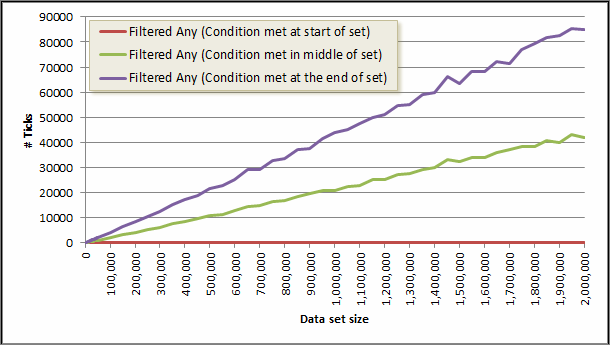
If you have a filter (a Where clause) then Any may take longer that O(1). It will take as long as it takes to find anything that matches the filter or O(n) if nothing matches the filter.

I ran three tests, one where the filtered condition was met on the first element, one where the condition was met in the middle of the set and one where the condition was not met until the last element.

Summary

If you have a concrete type the performance is better when using the Count property both for cases when you need to know the number of elements in the corpus or when you need to know if there any any elements at all.

If you simply need to know if there are any elements at all in the corpus then the use of Any() works out better than using the LINQ extension method Count() as Count() must traverse the entire corpus (unless it derives from ICollection<T> whereas Any() will short circuit at the first available opportunity.

Running Queries on Excel Spreadsheets using SQL Server 2008

I’m more a database person than a spreadsheet person. I’m more used to using SQL to bend data to my will than all the fancy gubbins that you’ll find in Excel. With some chunky (for a spreadsheet) ad hoc data in hand I set about connecting it up to SQL Server so I could run a few choice SELECT statements on the data.

The details in this post work with 64bit editions of Excel 2010 and SQL Server 2008 R2

The basic ad hoc connection looks something like this:

SELECT *
FROM OPENDATASOURCE( 'Microsoft.ACE.OLEDB.12.0', 'Data Source="<full file path to excel file>"; Extended properties=Excel 12.0')...[<data sheet name>$]

However, if you try that in SQL Server Management Studio on a raw SQL Server installation you’ll get this error message:

Msg 15281, Level 16, State 1, Line 7
SQL Server blocked access to STATEMENT 'OpenRowset/OpenDatasource' of component 'Ad Hoc Distributed Queries' because this component is turned off as part of the security configuration for this server. A system administrator can enable the use of 'Ad Hoc Distributed Queries' by using sp_configure. For more information about enabling 'Ad Hoc Distributed Queries', see "Surface Area Configuration" in SQL Server Books Online.

Enabling Ad Hoc Remote Queries

I’ve linked to the Books On-Line entry in the above, but it is only part of the story. Once you’ve followed its instructions on opening the View Facets dialog, you have to hunt around a little to find where you turn on and off the ad hoc remote queries. To save you the time, they’re in the “Server Configuration” facet.

The alternative, also mentioned, is to issue a SQL Command. This command:

sp_configure 'Ad Hoc Distributed Queries', 1;

However, that still won’t work directly. You’ll get the following error message:

Msg 15123, Level 16, State 1, Procedure sp_configure, Line 51

The configuration option 'Ad Hoc Distributed Queries' does not exist, or it may be an advanced option.

The full SQL you need is:

sp_configure 'show advanced options', 1;
RECONFIGURE
GO
sp_configure 'Ad Hoc Distributed Queries', 1;
RECONFIGURE
GO

And you’ll get output that looks like this:

Configuration option 'show advanced options' changed from 0 to 1. Run the RECONFIGURE statement to install.

Configuration option 'Ad Hoc Distributed Queries' changed from 0 to 1. Run the RECONFIGURE statement to install.

Now, we can try running the SELECT statement again, but this time the following error appears:

Msg 7302, Level 16, State 1, Line 2

Cannot create an instance of OLE DB provider "Microsoft.ACE.OLEDB.12.0" for linked server "(null)".

ODBC Configuration

This is because the ODBC driver is not configured correctly, go to the Control Panel –> System and Security –> Administrative Tools –> Data Sources (ODBC), alternatively you can just type “ODBC” in the Windows start bar.

Either way, you get to this dialog:

And as you can see the ODBC Driver needed for reading Excel files is not installed. A pretty big configuration failure. But it is easy enough to get the correct drivers. You can download them from Microsoft:

However, there is a problem if you have 32bit Office installed and 64bit SQL Server. The 32bit installer for the ODBC Drivers won’t work with 64bit SQL Server, and the 64bit drivers won’t install if it finds an existing 32bit installation of Office on the machine. For my desktop machine that was a problem, but luckily my laptop is running both 64bit versions of Office and SQL Server.

Finally

I eventually found this code snippet that works:

SELECT *
FROM OPENROWSET('MSDASQL',
'DRIVER=Microsoft Excel Driver (*.xls, *.xlsx, *.xlsm, *.xlsb);
DBQ=c:devPerformance-results.xlsx',
'SELECT * FROM [results$]')

The only issue that I have with this is that it uses MSDASQL which is surrounded in uncertainty. In one blog post it was said to be deprecated and 64bit versions won’t be available. Yet, there is a 64-bit version available for download. But for the ad hoc work I’m doing at the moment, it works.

Entity Framework Tracing Provider: Schema specified is not valid

I’ve been trying to get the Tracing and Caching Provider Wrappers for Entity Framework working and I ran in to a small problem. It turned out it was actually a silly RTFM issue, but in case you miss out a step here’s what happens when it is missed.

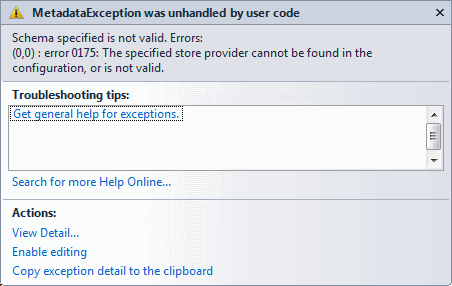
In the CreateWrappedMetadataWorkspace method in the EntityConnectionWrapperUtils class a MetadataException is thrown that states:

Schema specified is not valid. Errors:
(0,0) : error 0175: The specified store provider cannot be found in the configuration, or is not valid

This happens on the line that reads:

StoreItemCollection sic = new StoreItemCollection(ssdl.Select(c => c.CreateReader()));

[Note: Your Exception Assistant may show it on a different line but the stack trace in the exception itself will report correctly.]

What I had missed was some config changes I’d somehow missed out when I was setting up the provider. The missing config is:

<system.data>
  <DbProviderFactories>
    <add name="EF Caching Data Provider"
         invariant="EFCachingProvider"
         description="Caching Provider Wrapper"
         type="EFCachingProvider.EFCachingProviderFactory, EFCachingProvider, Version=1.0.0.0, Culture=neutral, PublicKeyToken=def642f226e0e59b" />
    <add name="EF Tracing Data Provider"
         invariant="EFTracingProvider"
         description="Tracing Provider Wrapper"
         type="EFTracingProvider.EFTracingProviderFactory, EFTracingProvider, Version=1.0.0.0, Culture=neutral, PublicKeyToken=def642f226e0e59b" />
    <add name="EF Generic Provider Wrapper"
         invariant="EFProviderWrapper"
         description="Generic Provider Wrapper"
         type="EFProviderWrapperToolkit.EFProviderWrapperFactory, EFProviderWrapperToolkit, Version=1.0.0.0, Culture=neutral, PublicKeyToken=def642f226e0e59b" />
  </DbProviderFactories>
</system.data>

Getting just the columns you want from Entity Framework

I’ve been looking at trying to optimise the data access in the project I’m working on, and the major stuff (like getting a piece of code that generated 6000 queries down to just 7) is now done. The next step is to look at smaller things that can still make savings.

At the moment, the queries return complete entities. However, that may not always be desirable. For example, I have an auto-complete feature that I just need an Id and some text data. The data comes from more than one table so at the moment I’m getting a rather large object graph back and throwing most of it away. It would be great to just retrieve the data we’re interested in and not have to waste time collating, transmitting, and mapping data we are then going to ignore.

So, using AdventureWorks as an example, here is some EF code to get the list of products we can use in an auto complete feature.

private IEnumerable<AutoCompleteData> GetAutoCompleteData(string searchTerm)
{
    using (var context = new AdventureWorksEntities())
    {
        var results = context.Products
            .Include("ProductSubcategory")
            .Where(p => p.Name.Contains(searchTerm)
                        && p.DiscontinuedDate == null)
            .AsEnumerable()
            .Select(p => new AutoCompleteData
                                {
                                    Id = p.ProductID,
                                    Text = BuildAutoCompleteText(p)
                                })
            .ToArray();
        return results;
    }
}

private static string BuildAutoCompleteText(Product p)
{
    string subcategoryName = string.Empty;
    if (p.ProductSubcategory != null)
        subcategoryName = p.ProductSubcategory.Name;

    return string.Format("{0} ({1}) @ ${2:0.00}", p.Name,
        subcategoryName, p.StandardCost);
}

This produces a call to SQL Server that looks like this:

exec sp_executesql N'SELECT
[Extent1].[ProductID] AS [ProductID],
[Extent1].[Name] AS [Name],
[Extent1].[ProductNumber] AS [ProductNumber],
[Extent1].[MakeFlag] AS [MakeFlag],
[Extent1].[FinishedGoodsFlag] AS [FinishedGoodsFlag],
[Extent1].[Color] AS [Color],
[Extent1].[SafetyStockLevel] AS [SafetyStockLevel],
[Extent1].[ReorderPoint] AS [ReorderPoint],
[Extent1].[StandardCost] AS [StandardCost],
[Extent1].[ListPrice] AS [ListPrice],
[Extent1].[Size] AS [Size],
[Extent1].[SizeUnitMeasureCode] AS [SizeUnitMeasureCode],
[Extent1].[WeightUnitMeasureCode] AS [WeightUnitMeasureCode],
[Extent1].[Weight] AS [Weight],
[Extent1].[DaysToManufacture] AS [DaysToManufacture],
[Extent1].[ProductLine] AS [ProductLine],
[Extent1].[Class] AS [Class],
[Extent1].[Style] AS [Style],
[Extent1].[ProductSubcategoryID] AS [ProductSubcategoryID],
[Extent1].[ProductModelID] AS [ProductModelID],
[Extent1].[SellStartDate] AS [SellStartDate],
[Extent1].[SellEndDate] AS [SellEndDate],
[Extent1].[DiscontinuedDate] AS [DiscontinuedDate],
[Extent1].[rowguid] AS [rowguid],
[Extent1].[ModifiedDate] AS [ModifiedDate],
[Extent2].[ProductSubcategoryID] AS [ProductSubcategoryID1],
[Extent2].[ProductCategoryID] AS [ProductCategoryID],
[Extent2].[Name] AS [Name1],
[Extent2].[rowguid] AS [rowguid1],
[Extent2].[ModifiedDate] AS [ModifiedDate1]
FROM  [Production].[Product] AS [Extent1]
LEFT OUTER JOIN [Production].[ProductSubcategory] AS [Extent2] ON [Extent1].[ProductSubcategoryID] = [Extent2].[ProductSubcategoryID]
WHERE ([Extent1].[Name] LIKE @p__linq__0 ESCAPE N''~'') AND ([Extent1].[DiscontinuedDate] IS NULL)',N'@p__linq__0 nvarchar(4000)',@p__linq__0=N'%silver%'

But as you can see from the C# code above, most of this is not needed. We are pulling back much more data than we need. It is even pulling back DiscontinuedDate which we already know must always be null.

What we can do is chain in a Select call that Entity Framework is happy with, that will give it the information it needs about the columns in the database that are actually being used.

So, why can’t it get the information it needs from the existing Select method?

Well, if I take away the AsEnumerable() call I’ll get an exception with a message that says “LINQ to Entities does not recognize the method ‘System.String BuildAutoCompleteText(DataAccess.EntityModel.Product)’ method, and this method cannot be translated into a store expression.

LINQ to Entities cannot understand this, so it has no idea that we are only using a fraction of the information it is bringing back. This brings us back to using a Select statement that LINQ to Entities is happy with. I’m going to use an anonymous type for that. The code then changes to this:

private IEnumerable<AutoCompleteData> GetAutoCompleteData(string searchTerm)
{
    using (var context = new AdventureWorksEntities())
    {
        var results = context.Products
            .Include("ProductSubcategory")
            .Where(p => p.Name.Contains(searchTerm)
                        && p.DiscontinuedDate == null)
            .Select(p => new
                            {
                                p.ProductID,
                                ProductSubcategoryName = p.ProductSubcategory.Name,
                                p.Name,
                                p.StandardCost
                            })
            .AsEnumerable()
            .Select(p => new AutoCompleteData
                                {
                                    Id = p.ProductID,
                                    Text = BuildAutoCompleteText(p.Name,
                                        p.ProductSubcategoryName, p.StandardCost)
                                })
            .ToArray();
        return results;
    }
}

private static string BuildAutoCompleteText(string name, string subcategoryName, decimal standardCost)
{
    return string.Format("{0} ({1}) @ ${2:0.00}", name, subcategoryName, standardCost);
}

[I’ve bolded the changes.]

What this is now able to do is to tell Entity Framework that we are only interested in just four columns, so when it generates the SQL code, that’s all it brings back:

exec sp_executesql N'SELECT
[Extent1].[ProductID] AS [ProductID],
[Extent2].[Name] AS [Name],
[Extent1].[Name] AS [Name1],
[Extent1].[StandardCost] AS [StandardCost]
FROM  [Production].[Product] AS [Extent1]
LEFT OUTER JOIN [Production].[ProductSubcategory] AS [Extent2] ON [Extent1].[ProductSubcategoryID] = [Extent2].[ProductSubcategoryID]
WHERE ([Extent1].[Name] LIKE @p__linq__0 ESCAPE N''~'') AND ([Extent1].[DiscontinuedDate] IS NULL)',N'@p__linq__0 nvarchar(4000)',@p__linq__0=N'%silver%'

Entity Framework query that never brings back data

I was recently optimising some data access code using the Entity Framework (EF) and I saw in the SQL Server Profiler this following emanating from the application:

SELECT
CAST(NULL AS varchar(1)) AS [C1],
CAST(NULL AS varchar(1)) AS [C2],
CAST(NULL AS varchar(1)) AS [C3],
CAST(NULL AS bit) AS [C4],
CAST(NULL AS varchar(1)) AS [C5],
CAST(NULL AS bit) AS [C6],
CAST(NULL AS varchar(1)) AS [C7],
CAST(NULL AS bit) AS [C8],
CAST(NULL AS bit) AS [C9]
FROM  ( SELECT 1 AS X ) AS [SingleRowTable1]
WHERE 1 = 0

At a glance it looks a little odd, but then the final line sealed it… WHERE 1 = 0!!! That will never return any rows whatsoever!

So what code caused this?

Here is an example using the AdventureWorks database:

private static IEnumerable<ProductCostHistory> GetPriceHistory(IEnumerable<int> productIDs)
{
    using (var products = new AdventureWorksEntities())
    {
        var result = products.ProductCostHistories
            .Where(pch => productIDs.Contains(pch.ProductID))
            .ToArray();
        return result;
    }
}

Called with code something like this:

int[] productIDs = new []{707, 708, 710, 711};
var history = GetPriceHistory(productIDs);

This will produce some SQL that looks like this:

SELECT
[Extent1].[ProductID] AS [ProductID],
[Extent1].[StartDate] AS [StartDate],
[Extent1].[EndDate] AS [EndDate],
[Extent1].[StandardCost] AS [StandardCost],
[Extent1].[ModifiedDate] AS [ModifiedDate]
FROM [Production].[ProductCostHistory] AS [Extent1]
WHERE [Extent1].[ProductID] IN (707,708,710,711)

So far, so good. The “where” clause contains a reasonable filter. But look what happens if the productsIDs arrays is empty.

SELECT
CAST(NULL AS int) AS [C1],
CAST(NULL AS datetime2) AS [C2],
CAST(NULL AS datetime2) AS [C3],
CAST(NULL AS decimal(19,4)) AS [C4],
CAST(NULL AS datetime2) AS [C5]
FROM  ( SELECT 1 AS X ) AS [SingleRowTable1]
WHERE 1 = 0

What a completely wasted roundtrip to the database.

Since we know that if the productIDs array is empty to start with then we won’t get any results back we can short circuit this and not run any code that calls the database if the input array is empty. For example:

private static IEnumerable<ProductCostHistory> GetPriceHistory(IEnumerable<int> productIDs)
{
    // Check to see if anything will be returned
    if (!productIDs.Any())
        return new ProductCostHistory[0];

    using (var products = new AdventureWorksEntities())
    {
        var result = products.ProductCostHistories
            .Where(pch => productIDs.Contains(pch.ProductID))
            .ToArray();
        return result;
    }
}

Tip of the day: Using the null-coalescing operator over the conditional operator

I’ve recently been refactoring a lot of code that used the conditional operator and looked something like this:

int someValue = myEntity.SomeNullableValue.HasValue
                    ? myEntity.SomeNullableValue.Value
                    : 0;

That might seem less verbose than the traditional alternative, which looks like this:

int someValue = 0;
if (myEntity.SomeNullableValue.HasValue)
    someValue = myEntity.SomeNullableValue.Value;

…or other variations on that theme.

However, there is a better way of expressing this. That is to use the null-coalescing operator.

Essentially, what is says is that the value on the left of the operator will be used, unless it is null in which case the value ont the right is used. You can also chain them together which effectively returns the first non-null value.

So now the code above looks a lot more manageable and understandable:

int someValue = myEntity.SomeNullableValue ?? 0;

Entity Framework: Unable to load the specified metadata resource.

Recently, I was refactoring some code and I moved the location of the .edmx file into a different folder (and new namespace). I updated the code to use the new namespace but when I ran the application a MetadataException was thrown with the message “Unable to load the specified metadata resource.”

When the location of the edmx file changes, so does the connection string. The reason is that an Entity Framework connection string does more than a normal database connection string. So, if you move the edmx file, you also have to update the connection string so that the entity framework can continue to find the resources that the edmx file defines.

The connection string contains details of how the database is mapped to the entities by referencing the CSDL (Conceptual Schema Definition Language), SSDL (Store Schema Definition Language) and MSL (Mapping Specification Language) resources which are defined in the .edmx file, so if the location of the mapping changes then the connection string also needs to be updated so that the entity framework can continue to map the database to the entities.

For example, if you have a little application with two projects, an application project (in this case, the imaginatively names ConsoleApplication2) and class library (named DataAccess). An app.config file will be created for the data access project by the entity framework tools in Visual Studio. Normally that can be copied (or just the connection string entries at least) to the app.config (or web.config) of the main application.

At this point the connection string looks like this:

metadata=res://*/Products.csdl|res://*/Products.ssdl|
res://*/Products.msl;provider=System.Data.SqlClient;
provider connection string=&quot;data source=(local);
initial catalog=AdventureWorks;integrated security=True;multipleactiveresultsets=True;
App=EntityFramework&quot;

As you can see it makes reference to the Products metadata in the calling assembly (that’s what the * means) which is split into the three resources (CSDL, SSDL & MSL) .

If a ModelEnties folder is created in the DataAccess project and the Products.edmx is moved into the ModelEntities folder then the location of the resource is moved, so the connection string is no longer valid. So, for the change that was just made the connection string needs to be updated to look like this:

metadata=res://*/EntityModel.Products.csdl|
res://*/EntityModel.Products.ssdl|
res://*/EntityModel.Products.msl;
provider=System.Data.SqlClient;provider connection string=&quot;data source=(local);initial catalog=
AdventureWorks;integrated security=True;
multipleactiveresultsets=True;App=EntityFramework&quot;

I’ve bolded the bits that have changed.

If you want to quickly get an updated connection string, you can open the edmx file and click in the design area then press F4 (or the menu View→Properties Window). The window will show Connection String property which can be copied and pasted into the config file.

Why should you be returning an IEnumerable

I’ve seen in many places where a method returns a List<T> (or IList<T>) when it appears that it may not actually really be required, or even desirable when all things are considered.

A List is mutable, you can change the state of the List. You can add things to the List, you can remove things from the List, you can change the items the List contains. This means that everything that has a reference to the List instantly sees the changes, either because an element has changed or elements have been added or removed. If you are working in a multi-threaded environment, which will be increasingly common as time goes on, you will get issues with thread safety if the List is used inside other threads and one or more threads starts changing the List.

Return values should, unless you have a specific use case in mind already, be returning an IEnumerable<T> which is not mutable. If the underlying type is still a List (or Array or any of a myriad of other types that implement IEnumerable<T>) you can still cast it. Also, some LINQ expressions will self optimise if the underlying type is one which better supports what LINQ is doing. (Remember that LINQ expressions always take an IEnumerable<T> or IQueryable<T> anyway so you can do what you like regardless of what the underlying type is).

If you ensure that your return values are IEnumerable<T> to begin with yet further down the line you realise you need to return an Array or List<T> from the method it is easy to start doing that. This is because everything accepting the return value from the method will still be expecting an IEnumerable<T> which List<T> and Array implement. If, however, you started with a List<T> and move to returning an IEnumerable<T> then because so much code will have the expectation of a List<T> without actually needing it you will have a lot of refactoring to do just to update the reference types.

Have I convinced you yet? If not, think about this. How often are you inserting items into a collection of objects after the initial creation routine? How often do you remove items from a collection after the initial creation routine? How often do you need to access a specific item by index within a collection after the initial creation routine? My guess is almost never. There are some occasions, but not actually that many.

It took me a while to get my head around always using an IEnumerable<T>, until I realised that I almost never require to do the things in the above paragraph. I almost always just need to loop over a collection of objects, or filter a collection of objects to produce a smaller set. Both of those things can be done with just an IEnumerable<T> and LINQ.

But, what if I need a count of the objects in the List<T>, that would be inefficient with an IEnumerable<T> and LINQ? Well, do you really need a count? Oftentimes I just need to know if there are any objects at all in the collection, I don’t care how many object there actually are, in which case the LINQ extension method Any() can be used. If you do need a count LINQ is clever enough to work out that the underlying type may expose a Count property and it calls that (anything that implements ICollection<T> such as arrays, lists, dictionaries, sets, and so on) so it is not iterating over all the objects counting them up each time.

Remember, there is nothing necessarily wrong with putting a ToArray() to ToList() before returning as a reference to an IEnumerable<T> something to which a LINQ expression has been applied. That removes the issues that deferred execution can bring (e.g. unexpected surprises when it suddenly evaluates during the first iteration but breaks in the process) or repeatedly applying the filter in the Where() method or the transformation in the Select() method.

Just because an object is of a specific type, doesn’t mean you have to return that specific type.

For example, consider the services you actually need on the collection that you are returning, remembering how much LINQ gives you. The following diagram shows what each of the interfaces expect to be implemented what a number of the common collection types implement themselves.

Incidentally, the reason some of the interfaces on the Array class are in a different colour is that these interfaces are added by the runtime. So if you have a string[] it will expose IEnumerable<string>.

I’d suggest that as a general rule IEnumerable<T> should be the return type when you have anything that implements it as the return type from the method, unless something from an ICollection<T> or IList<T> (or any other type of collection) as absolutely desperately in needed and not just because some existing code expects, say, an IList<T> (even although it is using no more services from it that it would had it been an IEnumerable<T>).

The mutability that implementations of ICollection<T> and IList<T> give will prove problematic in the long term. If you have a large team with members that don’t fully understand what is going on (and this is quite common given the general level developer documentation) they are likely to change the contents of the collection without understanding its implications. In some situations this may fine, in others it may be disastrous.

Finally, if you absolutely do need to return a more specific collection type then instead of returning a reference to the concrete class, return a reference to the lowest interface that you need. For example, if you have a List<T> and you need to add further items to it, but not at specific locations in the list, then ICollection<T> will be the most suitable return type.