Prallelisation Talk Example – Tasks within Tasks

In this example I’m showing the launching of further tasks within an existing task.

The Main method launches a single task (of course, it would likely be many tasks in a real system) which is implemented by MainTask and then waits for that task to complete. The MainTask then launches many independent tasks (impelemnted as SubTask and attaches each of them to the parent task (in this case MainTask). This has the effect that when MainTask ends the code in Main is still blocked at the Wait call until all the child tasks have also completed.

Code Example

class Program
{
    static void Main(string[] args)
    {
        Task t = Task.Factory.StartNew(MainTask);
        t.Wait();

        Console.WriteLine("Program finished");
        Console.ReadLine();
    }

    public static void MainTask()
    {
        Console.WriteLine("Starting the Main Task");

        Task.Factory.StartNew(SubTask, TaskCreationOptions.AttachedToParent);
        Task.Factory.StartNew(SubTask, TaskCreationOptions.AttachedToParent);
        Task.Factory.StartNew(SubTask, TaskCreationOptions.AttachedToParent);
        Task.Factory.StartNew(SubTask, TaskCreationOptions.AttachedToParent);
        Task.Factory.StartNew(SubTask, TaskCreationOptions.AttachedToParent);
        Task.Factory.StartNew(SubTask, TaskCreationOptions.AttachedToParent);
        Task.Factory.StartNew(SubTask, TaskCreationOptions.AttachedToParent);
        Task.Factory.StartNew(SubTask, TaskCreationOptions.AttachedToParent);
        Task.Factory.StartNew(SubTask, TaskCreationOptions.AttachedToParent);
        Task.Factory.StartNew(SubTask, TaskCreationOptions.AttachedToParent);

        Console.WriteLine("Ending the Main Task");
    }

    public static void SubTask()
    {
        Console.WriteLine("Starting SubTask {0}", Task.CurrentId);
        Thread.Sleep(2500);
        Console.WriteLine("Ending SubTask {0}", Task.CurrentId);
    }
}


Output

Tasks within Tasks Example

Starting the Main Task
Ending the Main Task
Starting SubTask 1
Starting SubTask 2
Starting SubTask 3
Starting SubTask 4
Starting SubTask 5
Starting SubTask 6
Ending SubTask 2
Starting SubTask 7
Ending SubTask 1
Starting SubTask 8
Ending SubTask 3
Starting SubTask 9
Ending SubTask 4
Starting SubTask 10
Ending SubTask 5
Ending SubTask 6
Ending SubTask 7
Ending SubTask 8
Ending SubTask 9
Ending SubTask 10
Program finished

See also

I have also writtent a blog post on Tasks that create more work which may give further insight into this area.

Parallelisation Talk Example – Parallel.Invoke

Parallel.Invoke is the most basic way to start many tasks as the same time. The method takes as many Action<…> based delegates as needed. The Task Parallel Library takes care of the actual scheduling, degree of parallelism etc. Parallel.Invoke itself blocks until all the tasks have completed.

In this example there are two tasks that simply output numbers and letters to the console. One task takes slightly longer than the other. The output shows each task as it runs along with an indication of when it finishes, as well as the overall program finishes.

Code Example One

class Program
{
    static void Main(string[] args)
    {
        // Start two tasks in parallel
        Parallel.Invoke(TaskOne, TaskTwo);

        Console.WriteLine("Finished");
        Console.ReadLine();
    }

    // This task simple outputs the numbers 0 to 9
    private static void TaskOne()
    {
        for (int i = 0; i < 10; i++)
        {
            Console.WriteLine("TaskOne: {0}", i);
            Thread.Sleep(10);
        }
        Console.WriteLine("TaskOne Finished");
    }

    // This task simply outputs the letters A to K
    private static void TaskTwo()
    {
        for(char c = 'A'; c < 'K'; c++)
        {
            Console.WriteLine("TaskTwo: {0}", c);
            Thread.Sleep(5);
        }
        Console.WriteLine("TaskTwo Finished");
    }
}

Example output

Parallel.Invoke Example

TaskOne: 0
TaskTwo: A
TaskOne: 1
TaskTwo: B
TaskTwo: C
TaskTwo: D
TaskOne: 2
TaskTwo: E
TaskOne: 3
TaskTwo: F
TaskTwo: G
TaskTwo: H
TaskOne: 4
TaskTwo: I
TaskTwo: J
TaskOne: 5
TaskTwo Finished
TaskOne: 6
TaskOne: 7
TaskOne: 8
TaskOne: 9
TaskOne Finished
Finished

Code Example: Variation using Task.Factory.StartNew

The Parallel.Invoke method is equivalent setting up a number of tasks using Task.Factory.StartNew(…) then Task.WaitAll(…).

The following code example shows the same code (Main method only) but using Task.Factory.StartNew:

static void Main(string[] args)
{
    // Start two tasks in parallel
    Task t1 = Task.Factory.StartNew(TaskOne);
    Task t2 = Task.Factory.StartNew(TaskTwo);
    Task.WaitAll(t1, t2);

    Console.WriteLine("Finished");
    Console.ReadLine();
}

Parallelisation Talk Example – ConcurrentBag

This example shows a ConcurrentBag being populated and it being accessed while another task is still populating the bag.

The ConcurrentBag class can be found in the System.Collections.Concurrent namespace

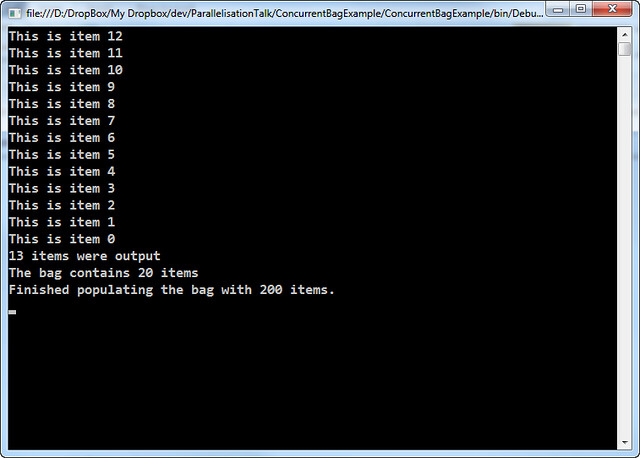
In this example, the ConcurrentBag is populated in task that is running in the background. After a brief pause in order to allow the background task time to put some items in the bag, main thread starts outputting the contents of the bag.

When the code starts to iterate over the bag, a snapshot is taken so that the enumeration is not tripped up by additional items being added or removed from the bag elsewhere. You can see this effect as only 13 items are output, yet immediately afterwards the bag has 20 items (in this example, if you run the code yourself you may get different results)

Code Example

class Program
{
    private static ConcurrentBag<string> bag = new ConcurrentBag<string>();
    static void Main(string[] args)
    {
        // Start a task to run in the background.
        Task.Factory.StartNew(PopulateBag);

        // Wait a wee bit so that the bag can get populated
        // with some items before we attempt to output them.
        Thread.Sleep(25);

        // Display the contents of the bag
        int count = 0;
        foreach (string item in bag)
        {
            count++;
            Console.WriteLine(item);
        }

        // Show the difference between the count of items
        // displayed and the current state of the bag
        Console.WriteLine("{0} items were output", count);
        Console.WriteLine("The bag contains {0} items", bag.Count);

        Console.ReadLine();
    }

    public static void PopulateBag()
    {
        for (int i = 0; i < 200; i++ )
        {
            bag.Add(string.Format("This is item {0}", i));

            // Wait a bit to simulate other processing.
            Thread.Sleep(1);
        }

        // Show the final size of the bag.
        Console.WriteLine("Finished populating the bag with {0} items.", bag.Count);
    }
}

Typical output

ConcurrentBag Example

This is item 12
This is item 11
This is item 10
This is item 9
This is item 8
This is item 7
This is item 6
This is item 5
This is item 4
This is item 3
This is item 2
This is item 1
This is item 0
13 items were output
The bag contains 20 items
Finished populating the bag with 200 items.

Parallelisation Talk Examples – ConcurrentDictionary

The example used in the talk was one I had already blogged about. The original blog entry the example was based upon is here: Parallelisation in .NET 4.0 – The ConcurrentDictionary.

Code Example

class Program
{
    private static ConcurrentDictionary<string, int> wordCounts =
        new ConcurrentDictionary<string, int>();

    static void Main(string[] args)
    {
        string[] lines = File.ReadAllLines("grimms-fairy-tales.txt");
        Parallel.ForEach(lines, ProcessLine);

        Console.WriteLine("There are {0} distinct words", wordCounts.Count);
        var topForty = wordCounts.OrderByDescending(kvp => kvp.Value).Take(40);
        foreach (KeyValuePair word in topForty)
        {
            Console.WriteLine("{0}: {1}", word.Key, word.Value);
        }
        Console.ReadLine();
    }

    private static void ProcessLine(string line)
    {
        var words = line.Split(' ')
            .Select(w => w.Trim().ToLowerInvariant())
            .Where(w => !string.IsNullOrEmpty(w));
        foreach (string word in words)
            CountWord(word);
    }

    private static void CountWord(string word)
    {
        if (!wordCounts.TryAdd(word, 1))
            UpdateCount(word);
    }

    private static void UpdateCount(string word)
    {
        int value = wordCounts[word];
        if (!wordCounts.TryUpdate(word, value + 1, value))
        {
            Console.WriteLine("Failed to count '{0}' (was {1}), trying again...",
                word, value);

            UpdateCount(word);
        }
    }
}

Downloads

Parallelisation Talk Examples – Basic PLINQ

These are some code examples from my introductory talk on Parallelisation showing the difference between a standard sequential LINQ query and its parallel equivalent.

The main differences between this and the previous two examples (Parallel.For and Parallel.ForEach) is that LINQ (and PLINQ) is designed to return data back, so the LINQ expression uses a Func<TResult, T1, T2, T3…> instead of an Action<T1, T2, T3…>. Since the examples were simply outputting a string to the Console to indicate which item or index was being processed I’ve changed the code to return a string back to the LINQ expression. The results are then looped over and output to the console.

It is also important to remember that LINQ expressions are not evaluated until the data is called for. In the example below that is with the .ToList() method call, however it may also be as a result of foreach or any other method of iterating over the expression results.

Code example 1: Sequential processing of data with LINQ

class Program
{
    private static Random rnd = new Random();

    static void Main(string[] args)
    {
        DateTime start = DateTime.UtcNow;

        IEnumerable<int> items = Enumerable.Range(0, 20);

        var results = items
            .Select(ProcessItem)
            .ToList();

        results.ForEach(Console.WriteLine);

        DateTime end = DateTime.UtcNow;
        TimeSpan duration = end - start;

        Console.WriteLine("Finished. Took {0}", duration);

        Console.ReadLine();
    }

    private static string ProcessItem(int item)
    {
        // Simulate similar but slightly variable length processing
        int pause = rnd.Next(900, 1100);
        Thread.Sleep(pause);

        return string.Format("Result of item {0}", item);
    }
}

The output of the above code may look something like this:

Basic LINQ

As you can see this takes roughly of 20 seconds to process 20 items with each item taking about one second to process.

Code Example 2: Parallel processing of data with PLINQ

The AsParallel extension method can be found in the System.Linq namespace so no additional using statements are needed if you are already using LINQ.

class Program
{
    private static Random rnd = new Random();

    static void Main(string[] args)
    {
        DateTime start = DateTime.UtcNow;

        IEnumerable<int> items = Enumerable.Range(0, 20);

        var results = items.AsParallel()
            .Select(ProcessItem)
            .ToList();

        results.ForEach(Console.WriteLine);

        DateTime end = DateTime.UtcNow;
        TimeSpan duration = end - start;

        Console.WriteLine("Finished. Took {0}", duration);

        Console.ReadLine();
    }

    private static string ProcessItem(int item)
    {
        // Simulate similar but slightly variable length processing
        int pause = rnd.Next(900, 1100);
        Thread.Sleep(pause);

        return string.Format("Result of item {0}", item);
    }
}

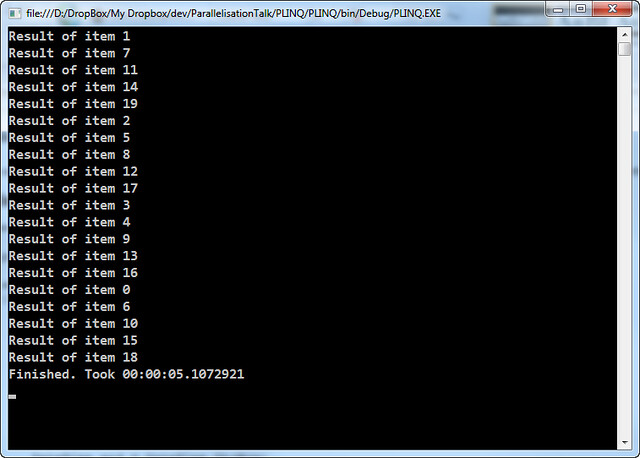
The output of the above code may look something like this:

Basic PLINQ

The result of this code is that it takes roughly 5 second to process the 20 items. I have a 4 core processor so it would be in line with the expectation that the work is distributed across all 4 cores.

Parallelisation Talk Examples – Parallel.ForEach

These are some code examples from my introductory talk on Parallelisation. Showing the difference between a standard sequential foreach loop and its parallel equivalent.

Code example 1: Serial processing of a foreach loop

class Program
{
    private static Random rnd = new Random();

    static void Main(string[] args)
    {
        DateTime start = DateTime.UtcNow;

        IEnumerable items = Enumerable.Range(0,20);

        foreach(int item in items)
            ProcessLoop(item);

        DateTime end = DateTime.UtcNow;
        TimeSpan duration = end - start;

        Console.WriteLine("Finished. Took {0}", duration);

        Console.ReadLine();
    }

    private static void ProcessLoop(int item)
    {
        Console.WriteLine("Processing item {0}", item);

        // Simulate similar but slightly variable length processing
        int pause = rnd.Next(900, 1100);
        Thread.Sleep(pause);
    }
}

The output of the above code may look something like this:

Sequential foreach Example

As you can see this takes roughly of 20 seconds to process 20 items with each item taking about one second to process.

Code Example 2: Parallel processing of a foreach loop

The Parallel class can be found in the System.Threading.Tasks namespace.

class Program
{
    private static Random rnd = new Random();

    static void Main(string[] args)
    {
        DateTime start = DateTime.UtcNow;

        IEnumerable items = Enumerable.Range(0,20);

        Parallel.ForEach(items,
            (item) => ProcessLoop(item));

        DateTime end = DateTime.UtcNow;
        TimeSpan duration = end - start;

        Console.WriteLine("Finished. Took {0}", duration);

        Console.ReadLine();
    }

    private static void ProcessLoop(int item)
    {
        Console.WriteLine("Processing item {0}", item);

        // Simulate similar but slightly variable length processing
        int pause = rnd.Next(900, 1100);
        Thread.Sleep(pause);
    }
}

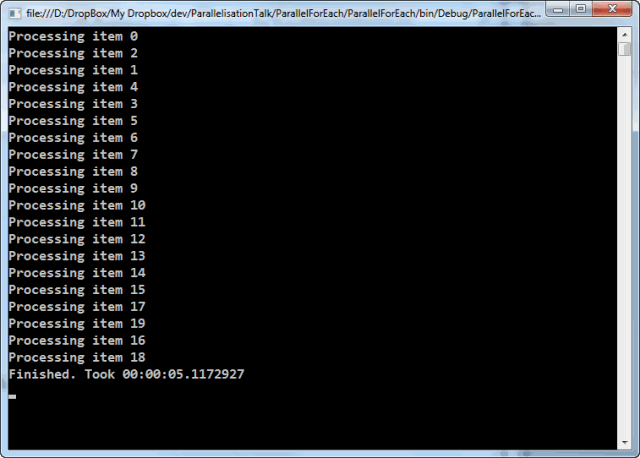
The output of the above code may look something like this:

Parallel.ForEach Example

The result of this code is that it takes roughly 5 second to process the 20 items. I have a 4 core processor so it would be in line with the expectation that the work is distributed across all 4 cores.

Parallelisation Talk examples – Parallel.For

This is some example code from my introductory talk on Parallelisation. Showing the difference between a standard sequential for loop and its parallel equivalent.

Code example 1: Serial processing of a for loop

class Program
{
    private static Random rnd = new Random();

    static void Main(string[] args)
    {
        DateTime start = DateTime.UtcNow;

        for (int i = 0; i < 20; i++)
            ProcessLoop(i);

        DateTime end = DateTime.UtcNow;
        TimeSpan duration = end - start;

        Console.WriteLine("Finished. Took {0}", duration);
    }

    private static void ProcessLoop(long i)
    {
        Console.WriteLine("Processing index {0}", i);

        // Simulate similar but slightly variable length processing
        int pause = rnd.Next(900, 1000);
        Thread.Sleep(pause);
    }
}

The output of the above code may look something like this:

Sequential for example

As you can see this takes just shy of 20 seconds to process 20 items.

Code Example 2: Parallel processing of a for loop

The Parallel class can be found in the System.Threading.Tasks namespace.

class Program
{
    private static Random rnd = new Random();

    static void Main(string[] args)
    {
        DateTime start = DateTime.UtcNow;

        Parallel.For(0, 20,
            (i) => ProcessLoop(i));

        DateTime end = DateTime.UtcNow;
        TimeSpan duration = end - start;

        Console.WriteLine("Finished. Took {0}", duration);

        Console.ReadLine();
    }

    private static void ProcessLoop(long i)
    {
        Console.WriteLine("Processing index {0}", i);

        // Simulate similar but slightly variable length processing
        int pause = rnd.Next(900, 1000);
        Thread.Sleep(pause);
    }
}

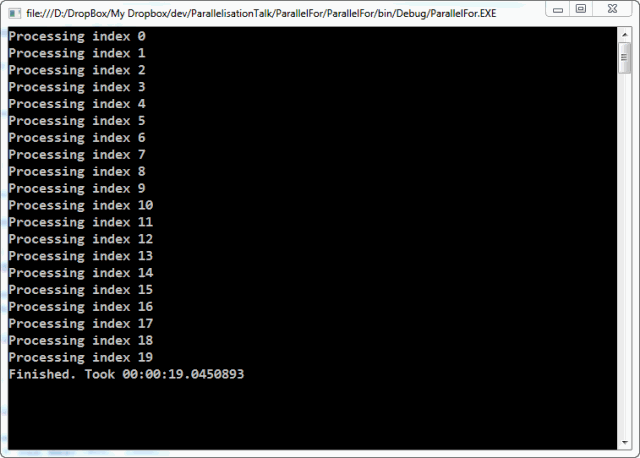
The output of the above code may look something like this:

Parallel.For Example

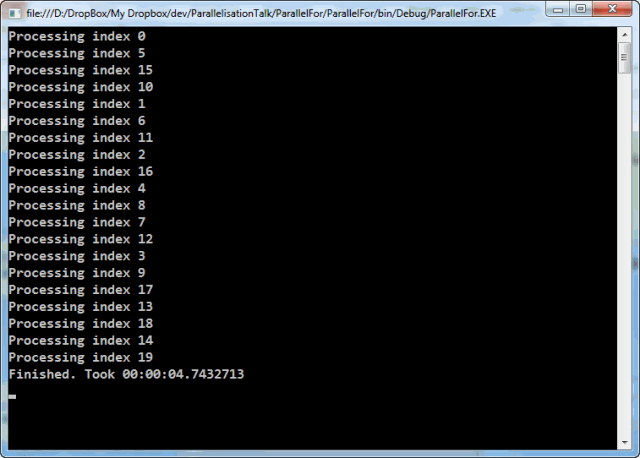
The result of this code is that it takes just shy of 5 second to process the 20 items. I have a 4 core processor so it would be in line with the expectation that the work is distributed across all 4 cores.

A bit of Google Analytics on my Blog

In the summer of 2007 I added Google Analytics to my blog. Here is some trivia I’ve learned since then

Browser and Operating System stats

Operating System All time Last Month
Windows (All) 95.23% 92.98%
Windows (XP) 52.94% 36.07%
Windows (Vista) 24.01% 9.40%
Windows (7) 17.04% 45.70%
Macintosh (All) 2.51% 3.59%
Linux (All) 1.31% 1.26%
iPhone (All) 0.35% 0.85%
Browser All time Last Month
IE (All) 49.50% 40.87%
IE (7.0) 22.79% 7.44%
IE (8.0) 17.13% 26.01%
IE (6.0) 9.27% 2.33%
IE (9.0) 0.31% 3.83%
Firefox (All) 34.17% 30.01%
Chrome (All) 11.35% 22.86%
Safari (All) 2.08% 3.67%
Opera (All) 2.06% 1.94%


Last month’s top 10 posts

Position Originally
posted
% Post
1 July/2008 12.18 SQL Server Memory Usage
2 June/2009 8.72 Dynamic Objects in C# 4.0
3 Aug/2008 6.37 Installing SQL Server 2005 on Vista
4 July/2009 5.99 Geeky Your Mom Jokes
5 Aug/2008 4.74 SQL Server / Visual Studio Install Order
6 Aug/2007 4.49 Chocolate Crunch Cake
7 June/2007 3.79 Internal Error 2755 caused by folder encryption
8 June/2007 3.70 SQL Exception because of a timeout
9 Oct/2009 3.43 Visual Studio / SQL Server install order on Windows 7
10 Oct/2008 3.09 Method hiding or overriding – or the difference between new and virtual


What is most curious is that 8 of the top ten are in summer months.

Building a tag cloud with LINQ

I have a set of blog posts that I’m representing as a List of BlogPost objects. A BlogPost is class I created that represents everything to do with a blog post. In it there is a list of all the categories (or tags) that a blog post has.

SelectMany

If I want to build a tag cloud based on all the categories then I first need to know what the categories are. This is where a little bit of LINQ code such as this comes in handy:

List<BlogPost> posts = GetBlogPosts();
var categories = posts.SelectMany(p => p.Categories);

The SelectMany flattens out all the Category lists in the all the posts to produce one result that contains all the categories. So, lets say there are three blog posts with the following categories:

Post One Post Two Post Three
.NET .NET SQL Server
C# C# Stored Procedure
LINQ ADO.NET
SelectMany Stored Procedure

However, as it simply flattens the structure the end result is:

  • .NET
  • C#
  • LINQ
  • SelectMany
  • .NET
  • C#
  • ADO.NET
  • StoredProcedure
  • SQL Server
  • Stored Procedure

Distinct

If I simply want a list of all the categories, I could modify the code above to chain a Distinct call in.

List<BlogPost> posts = GetBlogPosts();
var categories = posts
    .SelectMany(p => p.Categories)
    .Distinct();

That results in a shorter list, like this:

  • .NET
  • C#
  • LINQ
  • SelectMany
  • ADO.NET
  • Stored Procedure
  • SQL Server

GroupBy

However, what is needed is each item with a count of the number of times it is repeated. This is where GroupBy comes in. Here’s the code:

List<BlogPost> posts = GetBlogPosts();
var categoryGroups = posts
    .SelectMany(p => p.Categories)
    .GroupBy(c => c);
 
foreach (var group in categoryGroups)
{
    // Do stuff with each group.
    // group.Key is the name of the category
}

The GroupBy clause (line 4) takes an expression that returns the thing being grouped by. Since the List contains strings representing the category, we will be grouping by itself, so the expression returns itself.

Since the categoryGroups is enumerable we can use the LINQ extension methods on it to find out how many times each category is mentioned by using the Count() extension method.

This means we can get a result like this:

  • .NET : 2 posts
  • C# : 2 posts
  • LINQ : 1 post
  • SelectMany : 1 post
  • ADO.NET :1 post
  • Stored Procedure : 2 posts
  • SQL Server : 1 posts

Tasks that create more work

I’m creating a program that parses a web page then follows the links and then parses the next set of web pages to eventually build a picture of an entire site. This means that as the program runs more work is being generated and more tasks can be launched to process each new page as it is discovered.

My original solution was simply to create code like this:

     1:  private void ProcessLink(string link)
     2:  {
     3:      var page = GetPageInformation(link);
     4:      var newLinks = GetNewLinks(page);
     5:   
     6:      foreach(var newLink in newLinks)
     7:      {
     8:          Action action = () => {  ProcessLink(newLink); };
     9:          Task.Factory.StartNew(action, TaskCreationOptions.AttachedToParent);
    10:      }
    11:  }

The premise is simple enough, build a list of new links from a page then for each of the new links start a new task. The new task is attached to the parent task (the task that is launching the new set of tasks)

However, it soon became apparent that this was quickly getting out of control and I had no idea what was still waiting to be processed, or that the same link was being queue up multiple times in many different threads and so on. I ended up putting in place so many mechanisms to prevent the code processing the same page over again in different threads that it was getting silly. For a small number of new tasks being launched, I’m sure that Task.Factory.StartNew() is perfectly suitable.

I eventually realised that I was heading down the wrong way and I needed to rethink my strategy altogether. I wanted to make the code parallelisable so that while I was waiting on one page I could be parsing and processing another page. So, I eventually refactored it to this:

   1:  public class SiteScraper
     2:  {
     3:      private ConcurrentDictionary<string, ScraperResults> completedWork = 
     4:          new ConcurrentDictionary<string, ScraperResults>();
     5:   
     6:      private List<string> currentWork;
     7:   
     8:      private ConcurrentQueue<string> futureWorkQueue = 
     9:          new ConcurrentQueue<string>();
    10:   
    11:      public void GetSiteInformation(string startingUrl)
    12:      {
    13:          currentWork = new List<string();
    14:          currentWork.Add(startingUrl.ToLowerInvariant());
    15:   
    16:          while(currentWork.Any())
    17:          {
    18:              Parallel.ForEach(currentWorkQueue, item => GetPageInformation(item));
    19:              BuildWorkQueue();
    20:          }
    21:      }
    22:   
    23:      private void BuildWorkQueue()
    24:      {
    25:          currentWork = new List<string>(futureWorkQueue
    26:              .Select(link => link.ToLowerInvariant()).Distinct()
    27:              .Where(link => IsLinkToBeProcessed(link)));
    28:   
    29:          futureWorkQueue = new ConcurrentQueue<string>();
    30:      }
    31:   
    32:      private void GetPageInformation(string url)
    33:      {
    34:          // Do stuff
    35:          ProcessNewLinks(newLinks)
    36:      }
    37:   
    38:      private void ProcessNewLinks(IEnumerable<string> newLinks)
    39:      {
    40:          foreach (string url in newLinks.Where(l => IsLinkToBeProcessed(l)))
    41:          {
    42:              futureWorkQueue.Enqueue(url);
    43:          }
    44:      }
    45:   
    46:   
    47:      // Other bits
    48:   
    49:  }

There is still some code to ensure duplicates are removed and not processed, but it become much easier to debug and know what has been processed and what is still to be processed than it was before.

The method GetSiteInformation (lines 11-21) handles the main part of the parallelisation. This is the key to this particular algorithm.

Before discussing what that does, I just want to explain the three collections set up as fields on the class (lines 3 to 9). The completedWork is a dictionary keyed on the url containing an object graph representing the bits of the page we are interested in. The currentWork (line 6) is a list of the current urls that are being processed. Finally, the futureWorkQueue contains a queue of all the new links that are discovered, which will feed into the next iteration.

The GetSiteInformation class creates the initial list of currentWork and processes it using Parallel.ForEach (line 18). On the first iteration only one item will be processed, but it should result in many new links to be processed. A call to BuildWorkQueue builds the new work queue for the next iteration which is controlled by the while loop (lines 16-20). When BuildWorkQueue creates no new items for the workQueue then the work is complete and the while loop exits.

BuildWorkQueue is called when all the existing work is completed. It then builds the new set of urls to be processed. The futureWorkQueue is the collection that was populated when the links get processed (see later). All the links are forced into lower case (while this may not be advisable for all websites, for my case it is sufficient), only distinct elements are processed as the futureWorkQueue could quite easily have been filled with duplicates and finally a check is made to ensure that the link has not already been processed (lines 25-27).

During the processing of a specific URL (lines 32-36 – mostly not shown) new links may be generated. Each of these will be be added to the futureWorkQueue (lines 40-43). Before enqueuing any link a check is made to ensure it has not already been processed.

There are other bits of the class that are not shown. For example the IsLinkToBeProcessed method (which checks the domain, whether it has been processed already and so on) and the code that populates the completedWork.

In this version of the code it is much easier to see what has been completed and what is still to do (or at least, what has been found to do).