Errors like these drive me insane

Today I was trying to fix up a website for one of our clients. I got the site out of source control but somehow or other it wouldn’t compile. I’m not going to talk about the fact it didn’t compile out of the box – We all know that is not a good situation and the person who allows source to get into a state like that needs to be slapped repeatedly with a wet fish.

What I’m going to talk about is what the eventual error turned out to be because it is not something I’ve ever seen before and it was such a bizarre thing that I can only hope it isn’t common. But if you are afflicted by it you will be pleased to know that the solution is easy, even if the discovery of what the problem actually was wasted several hours.

If you are reading this then I suspect you will probably be suffering from this problem in which case you are probably now yelling “STOP BABBLING MAN AND TELL ME WHAT TO DO”.

First, a description of the problem:

There is an ASP.NET web site project (probably does the same thing on a web application… And let’s not get in to why this is a web site project, it’s an old project and the standard now is web applications) with a number of web forms in it.

The ASPX for the default page currently looks something like this:

<%@ Page Language="C#" AutoEventWireup="true"
      CodeFile="Default.aspx.cs" Inherits="Default" %>
<html>
<head><title></title></head>
<body>
    <form id="form1" runat="server">
        Stuff that's on my page
        <asp:Label ID="MyLabel" runat="server"></asp:Label>
    </form>
</body>
</html>

Nothing too odd about that, you might say… And you’d be right. There is nothing at all wrong with this page. However, when you go to compile your website you get this error:

Infuriation 2
The name ‘MyLabel’ does not exist in the current context

But… but… but… You can see that MyLabel exists on the ASPX page and if you type in the C# or VB source file you’ll see that intellisense finds the object perfectly well. So what is going on?

Well, it is interesting to note that Page1 and Page2 are very similar to Default. In fact, so similar that when they were created the person that did this just copied Default.aspx and Default.aspx.cs (or Default.aspx.vb if that’s your poison). What they didn’t do when they made the copies was to change the page directive at the top that has the Inherits attribute that points to Default. So, Page1 and Page2 are inheriting the behaviour in Default.

When this first happened that wasn’t a problem. Page1 and Page2 had just minor cosmetic differences, the behaviour was the same and no one noticed.

At some point later someone came along and added MyLabel to Default.aspx… This still didn’t make a difference. Everything worked as normal.

Then someone came along and realised that MyLabel needed to change on some condition and added some code into the Default.aspx.cs file that modified MyLabel. At this point all hell broke loose!

Suddenly, MyLabel can’t be found and no one can figure out why. It is there on the ASPX page, intellisense picks it up, the stupid compiler can’t see it.

The Solution

Eventually, after spending a couple of hours on the problem and batting it around some collegues and doing bit of brainstorming someone (let’s call him Craig Muirhead because he figured it out in the end and deserves the credit) comes up with the idea that perhaps other pages are inheriting the wrong class. A quick find in files on the name of the class and we found it was referenced by 4 other pages. It takes a matter of moments to fix all those files to point to their respective code behind files/classes rather than the one on our hapless page. And all of a sudden everything compiles.

Technorati Tags: ,,,,

Attendees Map

At Scottish Developers we ask for a partial postcode on our feedback forms to get an idea of how far people travel to get to our events. We’ve not really done an awful lot with this information so far, but with last Thursday’s event on ASP.NET MVC (held at Microsoft’s Edinburgh Office) getting our biggest turnout so far (49 people for an evening event) I thought it would be interesting to map out where these folk came from. Actually, while I was going through the feedback I got a feeling that many people travelled through from the west and that does seem to be true as you can see by the map. Kudos to the person who travelled from about half way up Loch Lomond – that was some trek.

And, in response to the person who wrote for event dislikes “Location: GLASGOW please” we do run lots of events in Glasgow, we’ve run many events in Glasgow and will continue to do so. We’ve run 8 events in Glasgow so far this year (9 if you include our conference, Developer Day Scotland) in comparison to just 2 in Edinburgh. We can see from the map that there were many people travelling from Glasgow to the ASP.NET MVC event and we are putting on many more events in Glasgow too. For the folk in Edinburgh who’ve been left without many events so far this year, rest assured that we are trying to remedy that and that next year we aim to put many more events on in Edinburgh – And if you know of a venue that we can use then please let me know.

Using PushPins with the Virtual Earth ASP.NET control

This uses the July 2008 CTP of the Windows Live tools. You can download the Windows Live Tools for Visual Studio.

In this post, we’re taking a look at using pushpins with the Virtual Earth ASP.NET control. We have a page similar to the previous post, with a map control on it called VEMap.

In the code behind we have a method for adding shapes to the map as this is a multi-step process. First we need to create an object to represent the point, then an object to represent the shape (we’ll come to other shape types later, but for the moment, we’re just dealing with pushpins), finally we add the shape to the map.

The Page_Load method adds a number of shapes to the map, these pushpins represent locations where Scottish Developers have held user group meetings. The code looks like this:

protected void Page_Load(object sender, EventArgs e)
{
    // Glasgow Caledonian University
    AddShape(55.8662120997906, -4.25060659646988);

    // Dundee University
    AddShape(56.4572643488646, -2.97848381102085);

    // Microsoft Edinburgh (George Street)
    AddShape(55.9525336325169, -3.20506207644939);

    // Microsoft Edinburgh (Waterloo Place)
    AddShape(55.9535374492407, -3.18680360913277);
}

private void AddShape(double latitude, double longitude)
{
    LatLongWithAltitude point = new LatLongWithAltitude(latitude, longitude);
    Shape shape = new Shape(ShapeType.Pushpin, point);
    VEMap.AddShape(shape);
}

From this we get a fairly standard output when the application is run:

At present, this is all visual. There isn’t any real functionality. What we’ll do is add some very basic functionality, so that when you hover over a pushpin it tells you something about it. The Shape object has a Description property into which you can put an HTML fragment. So, here is the updated code:

protected void Page_Load(object sender, EventArgs e)
{
    // Glasgow Caledonian University
    AddShape(55.8662120997906, -4.25060659646988,
        "<b>Glasgow Caledonian University</b>");

    // Dundee University
    AddShape(56.4572643488646, -2.97848381102085,
        "<b>Dundee University</b>");

    // Microsoft Edinburgh (George Street)
    AddShape(55.9525336325169, -3.20506207644939,
        "<b>Microsoft Edinburgh</b> (George Street)");

    // Microsoft Edinburgh (Waterloo Place)
    AddShape(55.9535374492407, -3.18680360913277,
        "<b>Microsoft Edinburgh</b> (Waterloo Place)");
}

private void AddShape(double latitude, double longitude, string description)
{
    LatLongWithAltitude point = new LatLongWithAltitude(latitude, longitude);
    Shape shape = new Shape(ShapeType.Pushpin, point);
    shape.Description = description;
    VEMap.AddShape(shape);
}

The result when you hover over a pushpin looks like this:

That’s all great if you want the default pushpin look. However, you might want to customise the pins so they match more what you are looking for. The Shape class has a CustomIcon property which you can set to be a graphics object. In the following example I’ve used a simple png file with a red circle and an semi-transparent yellow fill.

The code now looks like this:

private void AddShape(double latitude, double longitude, string description)
{
    LatLongWithAltitude point = new LatLongWithAltitude(latitude, longitude);
    Shape shape = new Shape(ShapeType.Pushpin, point);
    shape.Description = description;
    shape.CustomIcon = "images/target.png";
    VEMap.AddShape(shape);
}

And the result looks like this:

Finding things with Virtual Earth

This uses the July 2008 CTP of the Windows Live tools. You can download the Windows Live Tools for Visual Studio.

This is a very introductory post just to show how to find things using the Virtual Earth ASP.NET control.

First you need to add an assembly reference to the Virtual Earth control to your project:

In each page that you want to use the Virtual Earth control you must add a line that looks like this at the top of the file:

<%@ Register Assembly="Microsoft.Live.ServerControls.VE"
    Namespace="Microsoft.Live.ServerControls.VE"
    TagPrefix="ve" %>

This registers the assembly allowing you to use the control.

When you view the ASPX page you will see that you have additional tools in the toolbox that relate to Virtual Earth. The one we are going to look at in this post is the Map control.

From the tool box you can drag a map control onto your design surface. The code it generates will set up a default position and zoom level which centres on the continental United States.

By default the control is a 400x400px square and has been given a name of Map1:

<ve:Map ID="Map1" runat="server" Height="400px" Width="400px" ZoomLevel="4" />


To start with we are going to change the defaults to something that is closer to home (well, mine at least) and centre it on central and southern Scotland and zoom in somewhat. I also don’t like the name Map1 so I’m going to change that too:

<ve:Map ID="VEMap" runat="server" Height="600px" Width="400px" ZoomLevel="8"  Center-Latitude="55.75" Center-Longitude="-3.5" />

The first thing I should comment on is the zoom level because it doesn’t really mean anything to anyone. Personally, I’d like to say “here’s a bounding box for the area I want to see, you figure out how to do that and sort out the aspect ratio for me”. Then again, maybe that’s because when I wrote a GIS system for my final year project at university that was what I did. I didn’t constrain the user to specific and artificial zoom levels. The maths behind it isn’t difficult and a modern graphics card can do that with its proverbial eyes closed. Having said that I can understand why it was done that way. It means that none of the maps are generated on the fly, it is all based on pre-existing graphic files that are retrieved as needed. This means no strained servers trying to render maps.

The zoom level ranges from 1 to 19. 1 is zoomed out to the whole world and 19 is zoomed in to street level. In between that it seems to be mostly an matter of experimentation.

As it stands the program will display a map on the page and you can zoom in or out, pan around and change display modes and so on, just like Live Maps.

Next, we’ll add some functionality to find stuff. To that end a text box (SearchTextBox) will be added in order that we can type stuff in, and a button (SearchButton) that we can submit it. The code for the button click event is as follows:

protected void SearchButton_Click(object sender, EventArgs e)
{
    VEMap.Find(string.Empty, SearchTextBox.Text);
}

The two parameters on the Find method match the two text boxes you find on Live Maps. The first parameter is the “what” (i.e. the business name or category” and the second parameter is the “where” (i.e. The address, location or landmark). If you use Live Maps a lot you’ll probably already by used to just ignoring the first box, so I haven’t included anything to populate that parameter and will just leave it empty.

Now, when the application is run the map will update when the button is clicked. It will zoom to the location you’ve specified.

At present there is no mechanism to determine where to move the map to if there is any ambiguity. For example, type “Bolton” and you’ll be taken to Bolton, England rather than Bolton, NY. Type “Washington” and you’ll be taken to the District of Columbia rather than the state. On the other hand type WA (the standard two letter abbreviation for Washington State) and you will be taken to Washington state.

The Virtual Earth control can tell you about all the places that it thought about when it was deciding where to take you. To get that we have to handle the ServerFind event on the map control. In order to do that change the ASPX markup to read:

<ve:Map ID="VEMap" runat="server" OnServerFind="VEMap_ServerFind"  Height="600px" Width="400px" ZoomLevel="8"  Center-Latitude="55.75" Center-Longitude="-3.5" />

And then add a handler in the code behind:

protected void VEMap_ServerFind(object sender, FindEventArgs e)
{
    StringBuilder sb = new StringBuilder();

    foreach (Place place in e.Places)
    {
        sb.Append("<p><strong>");
        sb.Append(place.Name);
        sb.Append("</strong> (");
        sb.Append(place.MatchCode);
        sb.Append(")<br/>");
        sb.AppendFormat("Lat: {0}, Long: {1}", place.LatLong.Latitude, place.LatLong.Longitude);
        sb.Append("</p>");
    }
    ResultLiteral.Text = sb.ToString();
}

Note: A Literal control called ResultLiteral has also been added to the page to display the results.

The ServerFind event will be raised by the map control when it finds stuff, however, you’ll notice that the page does not include the text we’ve built up. You might be thinking at this point that the event isn’t being raised at all, but put a break point down inside the code of the event. You’ll see the breakpoint is being hit.

The problem is that the ServerEvent is being handled as part of an AJAX postback rather than a page postback. If you look at the stack trace you’ll see that the map control has its own internal UpdatePanel that you would normally need to indicate that part of the page was AJAXified, so to speak. So to ensure that the code works as we would expect it to we need to add some things to the ASPX file.

First off we need a ScriptManager:

<asp:ScriptManager ID="ScriptManager1" runat="server" EnablePartialRendering="true">
</asp:ScriptManager>

And secondly we need an update panel of our own in order to put the controls that will be updated when the ServerFind event is handled. So the update panel, with the controls we created earlier, looks something like this.

<asp:UpdatePanel ID="UpdatePanel1" runat="server">
    <ContentTemplate>
    <p>
        Search:
        <asp:TextBox ID="SearchTextBox" runat="server" />
        <asp:Button ID="SearchButton" runat="server" Text="Search"
          onclick="SearchButton_Click" />
    </p>
    <p>
        <asp:Literal ID="ResultLiteral" runat="server" />
    </p>
    </ContentTemplate>
</asp:UpdatePanel>

If we search for Bolton again the results look like this:

As you can see there are several Boltons in the world.

The FindEventArgs contains many bits of information, but in the sample above we’ve just concentrated on the Place. This gives you details of the places that have been found, how good a match it thinks the place is and where the place actually is. Obviously, the more specific you are in the search the more accurate the results are going to be and the more chance you have of getting an exact match.

Note: At present there is not much documentation for the Virtual Earth ASP.NET control. Much of the functionality has been gleaned from reading the documentation for the “classic” Virtual Earth control which is customisable through Javascript. I also found a bug, which has been reported to Microsoft, that if you happen to be in Birds Eye view then the find functionality does not work.

Method hiding or overriding – or the difference between new and virtual

When developing applications it is very important to understand the difference between method hiding and method overriding.

By default C# methods are non-virtual. If you are a Java developer this may come as a surprise. This means that in C# if you want a method to be extensible you must explicitly declare it as virtual if you want to override it.

So, what is overriding? Wikipedia has a succinct definition. Method overriding is a language feature that allows a subclass [aka derived class] to provide a specific implementation of a method that is already provided by … its [superclass] [aka base class]. The implementation in the subclass overrides (replaces) the implementation in the superclass.

The important thing to remember about overriding is that the method that is doing the overriding is related to the method in the base class.

Method hiding, by contrast, does not have a relationship between the methods in the base class and derived class. The method in the derived class hides the method in the base class.

I wouldn’t personally recommend method hiding as a strategy for developing code. In my opinion, if you feel the need to hide the method on the base class then you are most likely doing something wrong. I haven’t come across any scenarios where method hiding couldn’t be better implemented by other means, even as simple as just naming the method on the derived class to something else.

Let’s look at some code to show you what I mean. First off we are going to use this class structure (it’s my favourite when showing off inheritance, and you may have seen variations of it already on my blog).

Partial Class Diagram

Let’s say that the Dog class has a method call Bark()

public class Dog: Mammal
{
    public void Bark()
    {
        Console.WriteLine("Woof!");
    }
}

So far, so good. We can call it like this:

static void Main(string[] args)
{
    Dog d = new Dog();
    d.Bark();
    Console.ReadLine();
}

And the output of the program is as you’d expect. “Woof!” is written to the console.

Now, Chihuahuas are nippy wee things and they tend to “yip” rather than “woof” so what we’ll do is create a Bark() method in Chihuahua class that writes out “Yip!” instead.

public class Chihuahua : Dog
{
    public void Bark()
    {
        Console.WriteLine("Yip!");
    }
}

What happens here is that the C# compiler will display a warning to indicate that it has found a situation that it can guess at the intended functionality, but it really wants to to be explicit.

warning-message

‘Animals.Chihuahua.Bark()’ hides inherited member ‘Animals.Dog.Bark()’. Use the new keyword if hiding was intended.

By inserting the new keyword between the public and the void in the method declaration we can get rid of this warning. We are being explict and telling the compiler that we know what we are doing. So, what are the implications of method hiding? Consider the following bit of code:

static void Main(string[] args)
{
    Dog d = new Chihuahua();
    d.Bark();
    Console.ReadLine();
}

Well, if you have a Dog reference that actually refers to an instance of the Chihuahua class then when you call bark it will still say “Woof!” That goes against many people’s expectations. This is because you’ve actually drawn that line in the sand and are saying that the Bark method on Chihuahua is unrelated. If you hold a reference to a Dog then you may not be expected to know about the existence of a Chihuahua so if your calling code suddenly got the functionality of the Bark method in the Chihuahua class then it might break. The CLR cannot make that decision for you. If you do know about your Dog reference actually being a Chihuahua then you must cast it before using it. However, that means you are likely to have to litter your code with conditional statements based on the actual type of the object and that defeats the power of having an object oriented language.

What you should have done is make the Bark method virtual then overriden the derived version like this:

public class Dog : Mammal
{
    public virtual void Bark()
    {
        Console.WriteLine("Woof!");
    }
}
public class Chihuahua : Dog
{
    public override void Bark()
    {
        Console.WriteLine("Yip!");
    }
}

This way when you have a Chihuahua object then the correct Bark method is called regardless of the type of the reference so long as the reference type can see a Bark method on that hierarchy

The way I see it is that there is no reason to have to draw that line in the sand and use the new keyword in the context of method hiding. If you feel the need to do that then your two realistic options are either to consider whether what you really want to do is make the base virtual and then override in the derived class, or whether you need to think of a better name for the method in the derived class. If the methods are related (like the Bark example above) then method overriding is what you need. If they are not related then make that explicit by giving the method in the derived class a different name.

Microsoft Surface

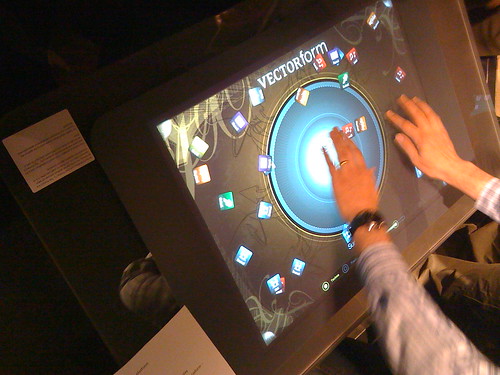
Last weekend I was in Reading for the UK and Ireland MVP Open Day. And one of the highlights of the day was being invited to the Microsoft Technology Center at Microsoft’s Thames Valley Park campus and to able to have a wee play on a Microsoft Surface device.

Microsoft SurfaceI’m sure you’ve seen the videos of it and it looks as if it is really cool. But, the videos that are shown are all aimed at how cool the device is to use. They are designed to sell it to hotels and casinos and other companies that could use it to entertain or sell to their customers. How cool would it be to go along to a pub quiz and have your team answer on a surface device rather than on a paper form. The quiz could have extra features that you can’t have in pub quizzes currently. The device could be used to show video or pictures to the quiz takers. In a tie-breaking situation the devices could record how quickly a team answered the questions and the tie is broken by the quickness of the responses. In fact there are a ton of things that you could do with it.

Now, I did see some of the cool applications for the surface device, such as the one to the left, but I also saw something that was way better to a geeky software developer like me. I saw some of the diagnostic side of it. I have to say that I’m really impressed.

Microsoft SurfaceFirst off lets start with what the device itself sees (see right). It works by having a bunch of video cameras on the underside pointing up at the surface. The cameras aren’t far reaching and can only really make out things that are within a few millimetres, or actually touching, the surface. As you pull your hand away the image gets faint very quickly. There is the ability to see what the cameras see in inverse (because if you have your hand touching the surface then the you won’t see the image because your hand is obscuring it). As you can see from the image on the right the hand that is touching the device is very clear, where as the others that are perhaps only a few centimetres above aren’t very visible, if at all. This means that any user who is animated about what is on the screen and is gesticulating during conversation is unlikely to accidentally affect the application unless they are near enough to almost touch it.

Microsoft SurfaceThat’s all very well and good, but what about writing applications. I don’t want to have to interpret camera images. That’s fine because all that is wrapped up in a framework that gives you useful information. For example, the picture to the left shows the information the Surface device feeds to the application developer when a person touches their finger to it. It is clever enough to identify the shape as a finger tip, it knows where it is on the surface and it can tell you the orientation. The fingers can be used in a similar way to a mouse, but with much more versatility.

Microsoft SurfaceOne of the key points about the Microsoft Surface device is that it is multi-touch. As you can see from the image on the right the device has successfully recognised that there are 5 fingers touching it (no pedantic comments about thumbs, please) and there are 5 contacts in total (I’ll come to the other types of contact in a moment). Under each contact point it displays a green oval representing where the touch is happening.

Microsoft SurfaceA blob is an object that is too large to be a finger is placed on the device, whereas a tag is something that has a recognisable tag attached to it. The tag identifies a portable device to the Surface. In the image on the left the phone has a tag attached to it. It allows the Surface to identify it. It can also determine the orientation of the phone (as can bee seen by the white arrow drawn on the Suface). Once the Surface recognises the device it can then interact with it.

If all this looks a bit much, it isn’t. A Microsoft Surface device is simply running Microsoft Windows Vista and the applications are written in WPF with an extra bit of goo that allows multi-touch interaction in an almost Minority Report kind of way, if only it were wall mounted and 2m by 3m in size.

All in all, it was an excellent demo, if a bit short. I would have liked to ask more questions about the SDK and actually seen how some of the applications were written (but that’s just me – I like to read code). If you are lucky enough to be going to the PDC then Microsoft will be releasing the Surface SDK so there will be an opportunity to find out more about the Microsoft Surface and how to write applications for it.

For more photos of the Microsoft Surface, please visit my Flickr site.

Are people really this gullible

I just got this in my email:

Let your email come to you.
With Yahoo! Mail Alerts, you’ll know
the instant you get one.
Account Alert
Dear Valued Member,

Due to the congestion in all Yahoo users and removal of all unused Yahoo Accounts,Yahoo would be shutting down all unused accounts,You will have to confirm your E-mail by filling out your Login Info below after clicking the reply botton, or your account will be suspended within 24 hours for security reasons.

UserName: ………………………………

Password:………………………………….

Date Of Birth: …………………………………..

Country Or Territory:..……………………….

After Following the instructions in the sheet,your account will not be interrupted and will continue as normal.Thanks for your attention to this request.We apologize for any inconvinience.


Are people really this gullible as to send their password unencrypted in a plain text email?! Not only that but in a manner that outwith the bounds of any previous interaction with the alleged company in question.

Well, I suppose if people are willing to hand over their passwords for £5 I shouldn’t be surprised.

THIS EMAIL IS A FAKE!
DON’T RESPOND TO IT!
YOU ARE ONLY HURTING YOURSELF!

Speaking at Scottish Developers

I was recently answering the questions of a speaker at an upcoming Scottish Developers event that I suddenly realised that I keep answering pretty much the same questions over again. Wouldn’t it just make more sense to put them in a blog post that I can amend from time-to-time and point new speakers at that.

First, I should point out that Scottish Developers have a number of “branches” and we all do things a little differently to fit the local community. Take, for example, the starting time. In Glasgow we usually start at 18:30. In Dundee it is 19:00.

Before the Event

I usually have the venue booked for one hour before the event is due to start. This gives myself or Frank ample time to set the room up and the speaker ample time to set up. We will normally be there at least 30 minutes before the start, sometimes we’ll even be there the full hour before.

I normally advertise “Doors Open” to be half an hour before the event starts to give attendees good time to get here and get seated.

At Glasgow Caledonian University the room will have a lectern with power, a VGA cable and an audio cable. There is access to a whiteboard or flip chart but we need to know in advance in order to bring suitable pens.

The Event Itself

At the start of the event, either myself or Frank will go through the Health and Safety spiel, talk about upcoming events that Scottish Developers are doing and anything else in the community that may be important to developers. We will then introduce the speaker.

As a speaker you will have up to 2 hours to talk. We suggest that if your talk is over 75 minutes that you allow for a 10-minute break midway. The two hour limit is an absolute maximum. We must be cleaned up and vacated by 21:00.

If you are appearing on the same evening as another speaker, please be mindful of the time. If you overrun that means less time for the other speaker. If, unfortunately, you are starting late then we will have to ask that you still finish on time, especially if the evening’s schedule is tight.

At the end of your talk you would hand back to the host (either myself or Frank) and we’ll encourage the audience to fill in the feedback. We usually encourage this by entering the feedback forms into a prize draw and the lucky winner or winners will go home with a prize. In the past prizes have ranged from a pair of Microsoft socks, to t-shirts, books, software licenses for things such as DevExpress’ Refactor!Pro and CodeRush or JetBrains’ ReSharper. Our top prize to date has been a one year MSDN Premium Team Suite Subscription (that’s worth over £8000)

After the Event

We normally go to Waxy O’Connor’s for a drink after the event.

When I get home I’ll try and collate the feedback as quickly as possible and send out the aggregate results. The feedback to the speaker is always anonymised. Normally I’ll get the feedback out that evening, sometimes it will be the following evening before it is sent out.


Are you interested in speaking at Scottish Developers?

We are always on the look out for new speakers who may wish to speak at our events. If you are interested, please contact me at colin@scottishdevelopers.com. If you are unsure, and don’t want to commit to a full length presentation we occasionally run open-mic nights (also known as Grok Talks) where you get 10 minutes to talk about something development-oriented.

Scottish Developers September Newsletter

Welcome

We’ve been busy lining up some great talks between now and the end of the year. It is a great opportunity to learn new techniques and new technologies and keep yourself ahead of the game.

We are continuing to trial a new events systems, so we’d be keen to hear what you think of it. The events pages will now be on Event Brite. You will be able to see all the details about an event there and register for it. There is also an RSS feed of all Scottish Developer’s upcoming events too.

After the talk earlier this month by Paul Cowan on ALT.NET he managed to get a lot of people interested in ASP.NET MVC. There was a real buzz about it after the event as it really grabbed people’s attention. I’ve managed to arrange for Mike Ormond from Microsoft to come up to Scotland and give a talk on the subject. An Introduction to ASP.NET MVC is on 16th October in Edinburgh.

As always, we are on the look out for new speakers. If you would like the opportunity to do a presentation on a software development topic from 10 minutes to 90 minutes then get in touch with me at colin@scottishdevelopers.com.

Regards,
Colin Mackay, Chairman, Scottish Developers

Links

Goodbye Mocks, Farewell Stubs: Roy Osherove discusses why terminology could be an obstacle to people taking up TDD practices.

Foundations of Programming: Karl Seguin’s primer on all things that make us better developers.

Events

1-October-2008 @ 19:00 in Dundee (Scottish Developers)
Using Git in a Team
FREE – Registration Optional

This talk will introduce you to Git and show you what you need to do to enable Git to work over the wire and how your team can synchronise their repositories with each other.

8-October-2008 @ 19:00 in Edinburgh (BCS)
The Three Ghosts of Microsoft Security
FREE – Registration Required

In this talk Stephen Lamb will take us through the history of Microsoft security, bringing us up to date on where Microsoft is at today and point out the direction of security improvements coming down the pipeline. He will also discuss how Microsoft responds to security incidents and explain the process to release updates and patches to fix vulnerabilities. Come along to hear why Microsoft software is now some of the most secure on the planet.

14-October-2008 @ 18:30 in Glasgow (Scottish Developers)
SQL Server Double Bill
FREE – Registration Optional

Two talks on SQL Server. One by Frank Kerrigan entitled “Practical Integration Services for SQL Server 2005/8” and the other by Martin Bell called “How do you do Hierarchies?”

15-October-2008 @ 19:00 in Dundee (Scottish Developers)
Erlang
FREE – Registration Optional

In this talk you’ll learn how Erlang discards traditional imperative assumptions, such as mutable data, liberating you to write programs that can scale to efficiently use thousands of cores concurrently!

16-October-2008 @ 19:00 in Edinburgh (Scottish Developers)
ASP.NET MVC Framework
FREE – Registration Required

In this session we’ll take a look at the drivers behind MVC, the architecture of a typical ASP.NET MVC application, new features in ASP.NET that make it possible and we’ll build a simple ASP.NET MVC application to explore the key concepts.

29-October-2008 @ 19:00 in Dundee (Scottish Developers)
Look! There’s my data! Virtual Earth san Javascript
FREE – Registration Optional

The Windows Live team have recently made available ASP.NET Server side controls for Microsoft Virtual Earth. In this talk Colin Angus Mackay will show you how to use this control to visualise your data, from sticking some simple pins down for store locations, to drawing thematic maps. All this without writing javascript.

Further Afield

November:
VBUG Conference (Reading)
TechEd Developers (Barcelona)
Dynamic Language Runtime (Dundee)
Red! Green! Then What? (Glasgow)
Developer! Developer! Developer! (Reading)
Functional Programming in C#3.0 (Dundee)

December:
Andrew Westgarth on ASP.NET development on IIS7 (Glasgow)

Current Jobs

Equator: Senior Developer, C# 2.0/3.0, .NET 2.0-3.5, ASP.NET, XML, SQL Server 2000/2005. More Info…

Sponsor’s message

SQL Know How are offering top quality SQL Server training courses at excellent value. Not only is the price great, but by entering the site from the links in this newsletter or on the Scottish Developer’s website you’ll get an additional 5% off the price. Their upcoming courses include the following

Smart Database Design
Paul Nielsen 29th – 30th September 2008 Edinburgh

SQL Server Data Storage Formats: Internals, Performance and Best Practices
Kalen Delaney 3rd November 2008 Harpenden, Hertfordshire

SQL Server Concurrency Control: Locking, Blocking and Row Versioning
Kalen Delaney 4th November 2008 Harpenden, Hertfordshire

SQL Server Data Internals and Tuning
Kalen Delaney 5th – 7th November 2008 Harpenden, Hertfordshire