Parallelisation Talk Example – ConcurrentBag

This example shows a ConcurrentBag being populated and it being accessed while another task is still populating the bag.

The ConcurrentBag class can be found in the System.Collections.Concurrent namespace

In this example, the ConcurrentBag is populated in task that is running in the background. After a brief pause in order to allow the background task time to put some items in the bag, main thread starts outputting the contents of the bag.

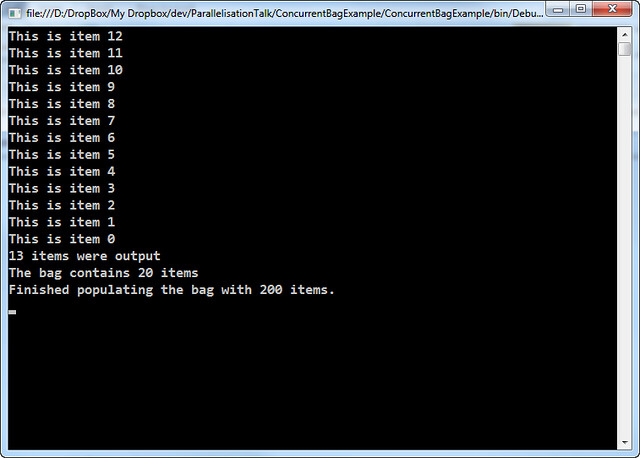
When the code starts to iterate over the bag, a snapshot is taken so that the enumeration is not tripped up by additional items being added or removed from the bag elsewhere. You can see this effect as only 13 items are output, yet immediately afterwards the bag has 20 items (in this example, if you run the code yourself you may get different results)

Code Example

class Program
{
    private static ConcurrentBag<string> bag = new ConcurrentBag<string>();
    static void Main(string[] args)
    {
        // Start a task to run in the background.
        Task.Factory.StartNew(PopulateBag);

        // Wait a wee bit so that the bag can get populated
        // with some items before we attempt to output them.
        Thread.Sleep(25);

        // Display the contents of the bag
        int count = 0;
        foreach (string item in bag)
        {
            count++;
            Console.WriteLine(item);
        }

        // Show the difference between the count of items
        // displayed and the current state of the bag
        Console.WriteLine("{0} items were output", count);
        Console.WriteLine("The bag contains {0} items", bag.Count);

        Console.ReadLine();
    }

    public static void PopulateBag()
    {
        for (int i = 0; i < 200; i++ )
        {
            bag.Add(string.Format("This is item {0}", i));

            // Wait a bit to simulate other processing.
            Thread.Sleep(1);
        }

        // Show the final size of the bag.
        Console.WriteLine("Finished populating the bag with {0} items.", bag.Count);
    }
}

Typical output

ConcurrentBag Example

This is item 12
This is item 11
This is item 10
This is item 9
This is item 8
This is item 7
This is item 6
This is item 5
This is item 4
This is item 3
This is item 2
This is item 1
This is item 0
13 items were output
The bag contains 20 items
Finished populating the bag with 200 items.

Parallelisation Talk Examples – ConcurrentDictionary

The example used in the talk was one I had already blogged about. The original blog entry the example was based upon is here: Parallelisation in .NET 4.0 – The ConcurrentDictionary.

Code Example

class Program
{
    private static ConcurrentDictionary<string, int> wordCounts =
        new ConcurrentDictionary<string, int>();

    static void Main(string[] args)
    {
        string[] lines = File.ReadAllLines("grimms-fairy-tales.txt");
        Parallel.ForEach(lines, ProcessLine);

        Console.WriteLine("There are {0} distinct words", wordCounts.Count);
        var topForty = wordCounts.OrderByDescending(kvp => kvp.Value).Take(40);
        foreach (KeyValuePair word in topForty)
        {
            Console.WriteLine("{0}: {1}", word.Key, word.Value);
        }
        Console.ReadLine();
    }

    private static void ProcessLine(string line)
    {
        var words = line.Split(' ')
            .Select(w => w.Trim().ToLowerInvariant())
            .Where(w => !string.IsNullOrEmpty(w));
        foreach (string word in words)
            CountWord(word);
    }

    private static void CountWord(string word)
    {
        if (!wordCounts.TryAdd(word, 1))
            UpdateCount(word);
    }

    private static void UpdateCount(string word)
    {
        int value = wordCounts[word];
        if (!wordCounts.TryUpdate(word, value + 1, value))
        {
            Console.WriteLine("Failed to count '{0}' (was {1}), trying again...",
                word, value);

            UpdateCount(word);
        }
    }
}

Downloads

Parallelisation Talk Examples – Basic PLINQ

These are some code examples from my introductory talk on Parallelisation showing the difference between a standard sequential LINQ query and its parallel equivalent.

The main differences between this and the previous two examples (Parallel.For and Parallel.ForEach) is that LINQ (and PLINQ) is designed to return data back, so the LINQ expression uses a Func<TResult, T1, T2, T3…> instead of an Action<T1, T2, T3…>. Since the examples were simply outputting a string to the Console to indicate which item or index was being processed I’ve changed the code to return a string back to the LINQ expression. The results are then looped over and output to the console.

It is also important to remember that LINQ expressions are not evaluated until the data is called for. In the example below that is with the .ToList() method call, however it may also be as a result of foreach or any other method of iterating over the expression results.

Code example 1: Sequential processing of data with LINQ

class Program
{
    private static Random rnd = new Random();

    static void Main(string[] args)
    {
        DateTime start = DateTime.UtcNow;

        IEnumerable<int> items = Enumerable.Range(0, 20);

        var results = items
            .Select(ProcessItem)
            .ToList();

        results.ForEach(Console.WriteLine);

        DateTime end = DateTime.UtcNow;
        TimeSpan duration = end - start;

        Console.WriteLine("Finished. Took {0}", duration);

        Console.ReadLine();
    }

    private static string ProcessItem(int item)
    {
        // Simulate similar but slightly variable length processing
        int pause = rnd.Next(900, 1100);
        Thread.Sleep(pause);

        return string.Format("Result of item {0}", item);
    }
}

The output of the above code may look something like this:

Basic LINQ

As you can see this takes roughly of 20 seconds to process 20 items with each item taking about one second to process.

Code Example 2: Parallel processing of data with PLINQ

The AsParallel extension method can be found in the System.Linq namespace so no additional using statements are needed if you are already using LINQ.

class Program
{
    private static Random rnd = new Random();

    static void Main(string[] args)
    {
        DateTime start = DateTime.UtcNow;

        IEnumerable<int> items = Enumerable.Range(0, 20);

        var results = items.AsParallel()
            .Select(ProcessItem)
            .ToList();

        results.ForEach(Console.WriteLine);

        DateTime end = DateTime.UtcNow;
        TimeSpan duration = end - start;

        Console.WriteLine("Finished. Took {0}", duration);

        Console.ReadLine();
    }

    private static string ProcessItem(int item)
    {
        // Simulate similar but slightly variable length processing
        int pause = rnd.Next(900, 1100);
        Thread.Sleep(pause);

        return string.Format("Result of item {0}", item);
    }
}

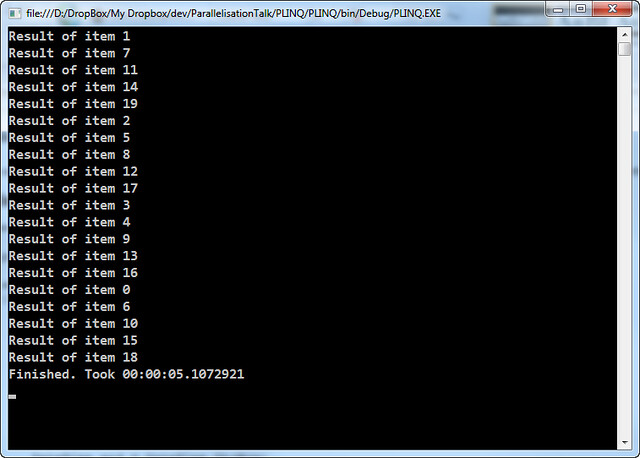
The output of the above code may look something like this:

Basic PLINQ

The result of this code is that it takes roughly 5 second to process the 20 items. I have a 4 core processor so it would be in line with the expectation that the work is distributed across all 4 cores.

Parallelisation Talk Examples – Parallel.ForEach

These are some code examples from my introductory talk on Parallelisation. Showing the difference between a standard sequential foreach loop and its parallel equivalent.

Code example 1: Serial processing of a foreach loop

class Program
{
    private static Random rnd = new Random();

    static void Main(string[] args)
    {
        DateTime start = DateTime.UtcNow;

        IEnumerable items = Enumerable.Range(0,20);

        foreach(int item in items)
            ProcessLoop(item);

        DateTime end = DateTime.UtcNow;
        TimeSpan duration = end - start;

        Console.WriteLine("Finished. Took {0}", duration);

        Console.ReadLine();
    }

    private static void ProcessLoop(int item)
    {
        Console.WriteLine("Processing item {0}", item);

        // Simulate similar but slightly variable length processing
        int pause = rnd.Next(900, 1100);
        Thread.Sleep(pause);
    }
}

The output of the above code may look something like this:

Sequential foreach Example

As you can see this takes roughly of 20 seconds to process 20 items with each item taking about one second to process.

Code Example 2: Parallel processing of a foreach loop

The Parallel class can be found in the System.Threading.Tasks namespace.

class Program
{
    private static Random rnd = new Random();

    static void Main(string[] args)
    {
        DateTime start = DateTime.UtcNow;

        IEnumerable items = Enumerable.Range(0,20);

        Parallel.ForEach(items,
            (item) => ProcessLoop(item));

        DateTime end = DateTime.UtcNow;
        TimeSpan duration = end - start;

        Console.WriteLine("Finished. Took {0}", duration);

        Console.ReadLine();
    }

    private static void ProcessLoop(int item)
    {
        Console.WriteLine("Processing item {0}", item);

        // Simulate similar but slightly variable length processing
        int pause = rnd.Next(900, 1100);
        Thread.Sleep(pause);
    }
}

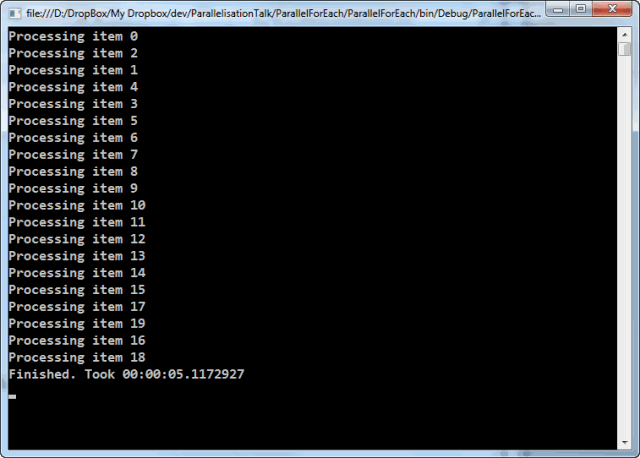
The output of the above code may look something like this:

Parallel.ForEach Example

The result of this code is that it takes roughly 5 second to process the 20 items. I have a 4 core processor so it would be in line with the expectation that the work is distributed across all 4 cores.

Parallelisation Talk examples – Parallel.For

This is some example code from my introductory talk on Parallelisation. Showing the difference between a standard sequential for loop and its parallel equivalent.

Code example 1: Serial processing of a for loop

class Program
{
    private static Random rnd = new Random();

    static void Main(string[] args)
    {
        DateTime start = DateTime.UtcNow;

        for (int i = 0; i < 20; i++)
            ProcessLoop(i);

        DateTime end = DateTime.UtcNow;
        TimeSpan duration = end - start;

        Console.WriteLine("Finished. Took {0}", duration);
    }

    private static void ProcessLoop(long i)
    {
        Console.WriteLine("Processing index {0}", i);

        // Simulate similar but slightly variable length processing
        int pause = rnd.Next(900, 1000);
        Thread.Sleep(pause);
    }
}

The output of the above code may look something like this:

Sequential for example

As you can see this takes just shy of 20 seconds to process 20 items.

Code Example 2: Parallel processing of a for loop

The Parallel class can be found in the System.Threading.Tasks namespace.

class Program
{
    private static Random rnd = new Random();

    static void Main(string[] args)
    {
        DateTime start = DateTime.UtcNow;

        Parallel.For(0, 20,
            (i) => ProcessLoop(i));

        DateTime end = DateTime.UtcNow;
        TimeSpan duration = end - start;

        Console.WriteLine("Finished. Took {0}", duration);

        Console.ReadLine();
    }

    private static void ProcessLoop(long i)
    {
        Console.WriteLine("Processing index {0}", i);

        // Simulate similar but slightly variable length processing
        int pause = rnd.Next(900, 1000);
        Thread.Sleep(pause);
    }
}

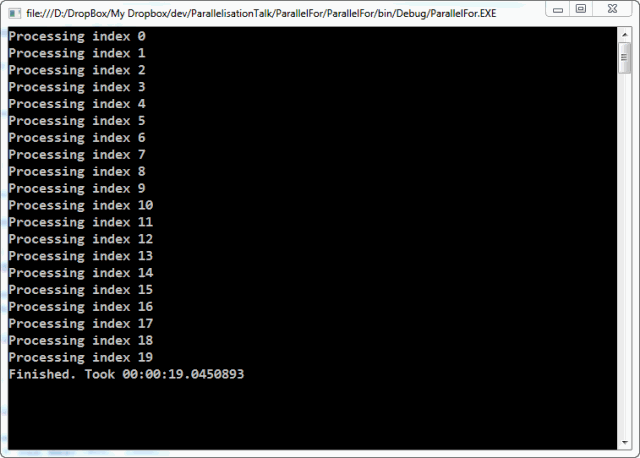
The output of the above code may look something like this:

Parallel.For Example

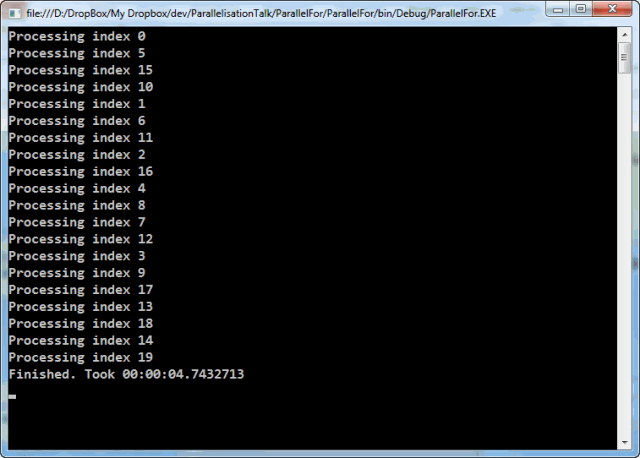
The result of this code is that it takes just shy of 5 second to process the 20 items. I have a 4 core processor so it would be in line with the expectation that the work is distributed across all 4 cores.

Building a tag cloud with LINQ

I have a set of blog posts that I’m representing as a List of BlogPost objects. A BlogPost is class I created that represents everything to do with a blog post. In it there is a list of all the categories (or tags) that a blog post has.

SelectMany

If I want to build a tag cloud based on all the categories then I first need to know what the categories are. This is where a little bit of LINQ code such as this comes in handy:

List<BlogPost> posts = GetBlogPosts();
var categories = posts.SelectMany(p => p.Categories);

The SelectMany flattens out all the Category lists in the all the posts to produce one result that contains all the categories. So, lets say there are three blog posts with the following categories:

Post One Post Two Post Three
.NET .NET SQL Server
C# C# Stored Procedure
LINQ ADO.NET
SelectMany Stored Procedure

However, as it simply flattens the structure the end result is:

  • .NET
  • C#
  • LINQ
  • SelectMany
  • .NET
  • C#
  • ADO.NET
  • StoredProcedure
  • SQL Server
  • Stored Procedure

Distinct

If I simply want a list of all the categories, I could modify the code above to chain a Distinct call in.

List<BlogPost> posts = GetBlogPosts();
var categories = posts
    .SelectMany(p => p.Categories)
    .Distinct();

That results in a shorter list, like this:

  • .NET
  • C#
  • LINQ
  • SelectMany
  • ADO.NET
  • Stored Procedure
  • SQL Server

GroupBy

However, what is needed is each item with a count of the number of times it is repeated. This is where GroupBy comes in. Here’s the code:

List<BlogPost> posts = GetBlogPosts();
var categoryGroups = posts
    .SelectMany(p => p.Categories)
    .GroupBy(c => c);
 
foreach (var group in categoryGroups)
{
    // Do stuff with each group.
    // group.Key is the name of the category
}

The GroupBy clause (line 4) takes an expression that returns the thing being grouped by. Since the List contains strings representing the category, we will be grouping by itself, so the expression returns itself.

Since the categoryGroups is enumerable we can use the LINQ extension methods on it to find out how many times each category is mentioned by using the Count() extension method.

This means we can get a result like this:

  • .NET : 2 posts
  • C# : 2 posts
  • LINQ : 1 post
  • SelectMany : 1 post
  • ADO.NET :1 post
  • Stored Procedure : 2 posts
  • SQL Server : 1 posts

Tasks that create more work

I’m creating a program that parses a web page then follows the links and then parses the next set of web pages to eventually build a picture of an entire site. This means that as the program runs more work is being generated and more tasks can be launched to process each new page as it is discovered.

My original solution was simply to create code like this:

     1:  private void ProcessLink(string link)
     2:  {
     3:      var page = GetPageInformation(link);
     4:      var newLinks = GetNewLinks(page);
     5:   
     6:      foreach(var newLink in newLinks)
     7:      {
     8:          Action action = () => {  ProcessLink(newLink); };
     9:          Task.Factory.StartNew(action, TaskCreationOptions.AttachedToParent);
    10:      }
    11:  }

The premise is simple enough, build a list of new links from a page then for each of the new links start a new task. The new task is attached to the parent task (the task that is launching the new set of tasks)

However, it soon became apparent that this was quickly getting out of control and I had no idea what was still waiting to be processed, or that the same link was being queue up multiple times in many different threads and so on. I ended up putting in place so many mechanisms to prevent the code processing the same page over again in different threads that it was getting silly. For a small number of new tasks being launched, I’m sure that Task.Factory.StartNew() is perfectly suitable.

I eventually realised that I was heading down the wrong way and I needed to rethink my strategy altogether. I wanted to make the code parallelisable so that while I was waiting on one page I could be parsing and processing another page. So, I eventually refactored it to this:

   1:  public class SiteScraper
     2:  {
     3:      private ConcurrentDictionary<string, ScraperResults> completedWork = 
     4:          new ConcurrentDictionary<string, ScraperResults>();
     5:   
     6:      private List<string> currentWork;
     7:   
     8:      private ConcurrentQueue<string> futureWorkQueue = 
     9:          new ConcurrentQueue<string>();
    10:   
    11:      public void GetSiteInformation(string startingUrl)
    12:      {
    13:          currentWork = new List<string();
    14:          currentWork.Add(startingUrl.ToLowerInvariant());
    15:   
    16:          while(currentWork.Any())
    17:          {
    18:              Parallel.ForEach(currentWorkQueue, item => GetPageInformation(item));
    19:              BuildWorkQueue();
    20:          }
    21:      }
    22:   
    23:      private void BuildWorkQueue()
    24:      {
    25:          currentWork = new List<string>(futureWorkQueue
    26:              .Select(link => link.ToLowerInvariant()).Distinct()
    27:              .Where(link => IsLinkToBeProcessed(link)));
    28:   
    29:          futureWorkQueue = new ConcurrentQueue<string>();
    30:      }
    31:   
    32:      private void GetPageInformation(string url)
    33:      {
    34:          // Do stuff
    35:          ProcessNewLinks(newLinks)
    36:      }
    37:   
    38:      private void ProcessNewLinks(IEnumerable<string> newLinks)
    39:      {
    40:          foreach (string url in newLinks.Where(l => IsLinkToBeProcessed(l)))
    41:          {
    42:              futureWorkQueue.Enqueue(url);
    43:          }
    44:      }
    45:   
    46:   
    47:      // Other bits
    48:   
    49:  }

There is still some code to ensure duplicates are removed and not processed, but it become much easier to debug and know what has been processed and what is still to be processed than it was before.

The method GetSiteInformation (lines 11-21) handles the main part of the parallelisation. This is the key to this particular algorithm.

Before discussing what that does, I just want to explain the three collections set up as fields on the class (lines 3 to 9). The completedWork is a dictionary keyed on the url containing an object graph representing the bits of the page we are interested in. The currentWork (line 6) is a list of the current urls that are being processed. Finally, the futureWorkQueue contains a queue of all the new links that are discovered, which will feed into the next iteration.

The GetSiteInformation class creates the initial list of currentWork and processes it using Parallel.ForEach (line 18). On the first iteration only one item will be processed, but it should result in many new links to be processed. A call to BuildWorkQueue builds the new work queue for the next iteration which is controlled by the while loop (lines 16-20). When BuildWorkQueue creates no new items for the workQueue then the work is complete and the while loop exits.

BuildWorkQueue is called when all the existing work is completed. It then builds the new set of urls to be processed. The futureWorkQueue is the collection that was populated when the links get processed (see later). All the links are forced into lower case (while this may not be advisable for all websites, for my case it is sufficient), only distinct elements are processed as the futureWorkQueue could quite easily have been filled with duplicates and finally a check is made to ensure that the link has not already been processed (lines 25-27).

During the processing of a specific URL (lines 32-36 – mostly not shown) new links may be generated. Each of these will be be added to the futureWorkQueue (lines 40-43). Before enqueuing any link a check is made to ensure it has not already been processed.

There are other bits of the class that are not shown. For example the IsLinkToBeProcessed method (which checks the domain, whether it has been processed already and so on) and the code that populates the completedWork.

In this version of the code it is much easier to see what has been completed and what is still to do (or at least, what has been found to do).

Using semaphores to restrict access to resources

I’m in the process of building a small data extraction application. It uses the new Parallel Extensions in .NET 4 in order to more efficiently extract data from a web service. While some threads are blocked waiting on the web service to respond, other threads are working away processing the results of the previous call.

Initially when I set this up I didn’t throttle the calls to the web service. I let everything through. However, in this environment I quickly discovered that I was having to re-try calls a lot because the original call for some data was timing out. When I looked in Fiddler to see what was going on I discovered that as I ran the application I was getting over a screen full of started requests that were not finishing or just taking a very long time to complete. I was overloading the server and it couldn’t cope with the volume of requests.

With this in mind I added in some code to the class that initiated the web service calls in order to ensure that it didn’t call the web service too frequently. This is where the semaphores come in to play.

Semaphores are a type of synchronisation mechanism that allow you to limit access to some segment of code. No more than a specified number of threads may enter the segment of code at any one time. If more threads attempt to enter that segment of code than are permitted then any new thread arriving will be forced to wait until access is granted.

I’ll show you what I mean:

   1:  public class WebServiceHelper
   2:  {
   3:      private static Semaphore pool = new Semaphore(3, 3);
   4:   
   5:      public ResultsData GetData(RequestData request)
   6:      {
   7:          try
   8:          {
   9:              pool.WaitOne();
  10:              return GetDataImpl(request);
  11:          }
  12:          finally
  13:          {
  14:              pool.Release();
  15:          }
  16:      }
  17:   
  18:      private ResultsData GetDataImpl(RequestData request)
  19:      {
  20:          // Do stuff here
  21:      }
  22:   
  23:  }

This is just a fragment of the class in order to show just the important bits.

In line 3 we set up the Semaphore as a static, so that all instances of the class can have access to it. It doesn’t need to be a static if you are going to reuse the same instance of the class in many places, but for the purposes of this example I’m using a static.

The Semaphore is initialised with an initial count of 3 (first parameter) which means that there are three resources available currently, and a maximum count  also of 3 (second parameter) which means we can have a maximum of three resources in use at any one time.

In the GetData method (lines 5-16) I wrap the call that does the actual work in a try-finally block. If any exceptions are thrown here is not the place to handle them. The only thing this method should be concerned with is ensuring the resources are properly synchronised. In line 9 we wait for a resource to become available (the first three calls will not block because we’ve started off with three available) but after that calls may block if necessary. On line 10 we call the method that does the actual work we are interested in (this prevents cluttering up one method with the details of the work needing done and the synchronisation code). In the finally block (lines 12 to 15)  we ensure that the resource is released regardless of the ultimate outcome. It doesn’t matter if an exception was thrown or if it was successful we always release the resource back at the end of the operation.

WaitOne (line 9) does have overloads that accept a time to wait either as a TimeSpan or integer representing milliseconds. This means that you can ensure you are not blocking infinitely if an error occurs and the resource is never released.

That just about sums it up. I now have an application that I can parallelise yet ensure that I don’t overload the web server at the same time.

I should also point out that using Semaphores (or any kind of locking or synchronisation method) does reduce the parallelisability of the application, but they can be useful to ensure safe access to data or resources. However, there are also other techniques which help reduce the need for these synchronisation schemes.

Parallelisation in .NET 4.0 – The concurrent dictionary

One thing that I was always conscious of when developing concurrent code was that shared state is very difficult to deal with. It still is difficult to deal with, however the Parallel extensions have some things to help deal with shared information better and one of them is the subject of this post.

The ConcurrentDictionary has accessors and mutators that “try” and work over the data. If the operation fails then it returns false. If it works you get a true, naturally. To show this, I’ve written a small program that counts the words in Grimm’s Fairy Tales (which I downloaded from the Project Gutenberg website) and displayed the top forty most used words.

Here is the program:

   1:  class Program
   2:  {
   3:      private static ConcurrentDictionary<string, int> wordCounts =
   4:          new ConcurrentDictionary<string, int>();
   5:   
   6:      static void Main(string[] args)
   7:      {
   8:          string[] lines = File.ReadAllLines("grimms-fairy-tales.txt");
   9:          Parallel.ForEach(lines, line => { ProcessLine(line); });
  10:   
  11:          Console.WriteLine("There are {0} distinct words", wordCounts.Count);
  12:          var topForty = wordCounts.OrderByDescending(kvp => kvp.Value).Take(40);
  13:          foreach (KeyValuePair<string, int> word in topForty)
  14:          {
  15:              Console.WriteLine("{0}: {1}", word.Key, word.Value);
  16:          }
  17:          Console.ReadLine();
  18:      }
  19:   
  20:      private static void ProcessLine(string line)
  21:      {
  22:          var words = line.Split(' ')
  23:              .Select(w => w.Trim().ToLowerInvariant())
  24:              .Where(w => !string.IsNullOrEmpty(w));
  25:          foreach (string word in words)
  26:              CountWord(word);
  27:      }
  28:   
  29:      private static void CountWord(string word)
  30:      {
  31:          if (!wordCounts.TryAdd(word, 1))
  32:              UpdateCount(word);
  33:      }
  34:   
  35:      private static void UpdateCount(string word)
  36:      {
  37:          int value = wordCounts[word];
  38:          if (!wordCounts.TryUpdate(word, value + 1, value))
  39:          {
  40:              Console.WriteLine("Failed to count '{0}' (was {1}), trying again...",
  41:                  word, value);
  42:   
  43:              UpdateCount(word);
  44:          }
  45:      }
  46:  }

The ConcurrentDictionary is set up in line 3 &4  with the word as the key and the count as the value, but the important part is in the CountWord and UpdateCount methods (starting on line 29 and 35 respectively).

We start by attempting to add a word do the dictionary with a count of 1 (line 31). If that fails then we must have already added the word to the dictionary, in which case we will need to update the existing value (lines 37-44). In order to do that we need to get hold of the existing value (line 37). We can do that with a simple indexer using the word as the key, we then attempt to update the value (line 38). The reason I say we attempt to do that is that there are many threads operating on the same dictionary object and we the update may fail.

The TryUpdate method ensures that you are updating the correct thing as it asks you to pass in the original value and the new value. If someone got there before you (a race condition) the original value will be different to what is currently in the dictionary and the update will not happen. This ensures that the data is consistent.  In our case, we simply try again.

The result of the application is as follows.

Failed to count 'the' (was 298), trying again...
Failed to count 'the' (was 320), trying again...
Failed to count 'and' (was 337), trying again...
Failed to count 'of' (was 113), trying again...
Failed to count 'the' (was 979), trying again...
Failed to count 'the' (was 989), trying again...
Failed to count 'and' (was 698), trying again...
Failed to count 'well' (was 42), trying again...
Failed to count 'the' (was 4367), trying again...
Failed to count 'and' (was 3463), trying again...
Failed to count 'the' (was 4654), trying again...
Failed to count 'to' (was 1772), trying again...
Failed to count 'the' (was 4798), trying again...
Failed to count 'the' (was 4805), trying again...
Failed to count 'the' (was 4858), trying again...
Failed to count 'her' (was 508), trying again...
Failed to count 'and' (was 3693), trying again...
Failed to count 'and' (was 3705), trying again...
Failed to count 'and' (was 3719), trying again...
Failed to count 'the' (was 4909), trying again...
Failed to count 'she' (was 600), trying again...
Failed to count 'to' (was 1852), trying again...
Failed to count 'curdken' (was 3), trying again...
Failed to count 'the' (was 4665), trying again...
Failed to count 'which' (was 124), trying again...
Failed to count 'the' (was 5361), trying again...
Failed to count 'and' (was 4327), trying again...
Failed to count 'to' (was 2281), trying again...
Failed to count 'they' (was 709), trying again...
Failed to count 'they' (was 715), trying again...
Failed to count 'and' (was 4668), trying again...
Failed to count 'you' (was 906), trying again...
Failed to count 'of' (was 1402), trying again...
Failed to count 'the' (was 6708), trying again...
Failed to count 'and' (was 5149), trying again...
Failed to count 'snowdrop' (was 21), trying again...
Failed to count 'draw' (was 18), trying again...
Failed to count 'he' (was 1834), trying again...
There are 10369 distinct words
the: 7168
and: 5488
to: 2725
a: 1959
he: 1941
of: 1477
was: 1341
in: 1136
she: 1134
his: 1031
that: 1024
you: 981
it: 921
her: 886
but: 851
had: 829
they: 828
as: 770
i: 755
for: 740
with: 731
so: 693
not: 691
said: 678
when: 635
then: 630
at: 628
on: 576
will: 551
him: 544
all: 537
be: 523
have: 481
into: 478
is: 444
went: 432
came: 424
little: 381
one: 358
out: 349

As you can see in this simple example, a race condition was encountered 38 times.

A quick intro to the HTML Agility Pack

I want a way to extract all the post data out of my blog. To do that I’m building a little application to do that, mostly as an exercise to try out some new technologies. In this post I’m going to show a little of the HTML Agility pack which is the framework I’m using to extract the information out of a blog entry page.

Creating an HtmlDocument

Where in the following code snippet, html is a string containing some HTML

HtmlDocument doc = new HtmlDocument();
doc.LoadHtml(html);

However, the HtmlDocument class also has a Load method that is overloaded and can accept a Stream, TextReader or a string (representing a file path) in order to get the HTML. The one obvious thing that was missing was a version that took a URL although HttpWebResponse does contain a ResponseStream which you could pass in.

Navigating the HTML Document

Once you have loaded in your HTML you will want to navigate it. To do that you need to get hold of HtmlNode that represents the document as a whole:

HtmlNode docNode = doc.DocumentNode;

The docNode will then give you all the bits and pieces you need to navigate around the HTML. If you are also ready used to using the LINQ XML classes introduced in .NET 3.5 then you shouldn’t have too much trouble finding your way around here.

For example, here is a snippet of code that gets all the URLs out of the anchor tags:

var linkUrls = docNode.SelectNodes("//a[@href]")
     .Select(node => node.Attributes["href"].Value);

The linkUrls variable is actually an IEnumerable<string> (if you are curious).

One thing that is particularly annoying

There is one thing that I find particularly annoying however. SelectNodes returns an HtmlNodeCollection, however, if the xpath in the SelectNodes method call results in no nodes being found then it returns a null instead of an empty collection. For me, it is perfectly valid to get an empty collection if the query returned no results. Because of this, I can’t simply write code like the section above. I actually have to check for null before continuing. That means the code in the previous section actually looks like this:

HtmlNodeCollection nodes = docNode.SelectNodes("//a[@href]");
if (nodes != null)
{
    var linkUrls = nodes.Select(node => node.Attributes["href"].Value);
    // And what ever else we were doing.
}

What next?

Well, as you can see the functionality is actually fairly easy to follow. I was initially dismayed at the lack of apparent documentation for it until I realised that the folks that have built the framework have done a great job of ensuring that it works very similarly to libraries already in the .NET framework itself so it is remarkably quick to get used to.