
Fixing out of sequence timestamps

I maintain a small open source project that helps test log message. Part of this is that each log message has a sequence number and timestamp attached to it. You should be able to sequence the logs by the sequence number or the timestamp and get the same sequence of logs, but on rare occasions this did not work.

I couldn’t understand it because the LogEntry class assigns the sequence and timestamp in a locked section, so they should always be in step with each other.

Here is a fragment of that class:

public class LogEntry
{
  private static int _sequence;
  private static readonly Lock SequenceSyncLock = new();

  public LogEntry(...)
  {
    // ... other initialisation ...
    lock (SequenceSyncLock)
    {
      Sequence = _sequence++;
      TimestampUtc = DateTime.UtcNow;
    }
  }

  public int Sequence { get; }
  public DateTime TimestampUtc { get; }
}

Each new instance will get an ever increasing sequence number, and the timestamp comes from DateTime.UtcNow so it should always be incrementing. But somehow, that’s not always the case.

Why might the time be out of sequence?

  • DateTime.UtcNow relies on the system clock, which may be updated by the user, by a network time service, or there may be a clock skew in virtualised environments.
  • In a multi-threaded environment, thread interruption or scheduling delays may make it appear to regress.
  • The resolution of the clock may not be accurate enough, so it doesn’t tick forward by the next call.

For example, when I run the following code:

const int iterations = 5_000_000;

var times = new DateTime[iterations];
for (int i = 0; i < iterations; i++)
{
    times[i] = DateTime.UtcNow;
}

int distinctTimes = times.Distinct().Count();
Console.WriteLine($"{iterations} times generated, but only {distinctTimes} distinct times produced.");

Of the five million calls to DateTime.UtcNow, there are only around 140,000 distinct times produced. So at the very least it could look like it is standing still.

I can use Shouldly to check that the array is ascending. But I do occasionally get an exception there. Adding the line:

times.ShouldBeInOrder(SortDirection.Ascending);

produces the following message:

times should be in ascending order but was not.
The first out-of-order item was found at index 2432937:
25/02/2025 23:10:52

So, how do we fix this?

We can ensure that timestamps are strictly increasing by using the clock’s resolution against it. Since the resolution is typically around 0.5ms to 15ms depending on the system, and we know that there are 10,000 ticks in a millisecond, we know that even on the best system DateTime.UtcNow will jump forwards by at least 5000 ticks when it moves forward.

public class LogEntry
{
  private static int _sequence;
  private static long _lastTimestampUtc;
  private static readonly Lock SequenceSyncLock = new();

  public LogEntry(...)
  {
    // ... other initialisation ...
    lock (SequenceSyncLock)
    {
      Sequence = _sequence++;
      var now = DateTime.UtcNow.Ticks;
      _lastTimestampUtc = Math.Max(_lastTimestampUtc + 1, now);
      TimestampUtc = new DateTime(_lastTimestampUtc, DateTimeKind.Utc);
    }
  }

  public int Sequence { get; }
  public DateTime TimestampUtc { get; }
}

So, we now get the current time as ticks, we then compare to the last timestamp. If the clock has moved forward then we use that, if the clock has stayed steady or moved backwards, then the we use the last timestamp plus one tick as timestamp for the new object.

Now all timestamps will move strictly forward in time only. We fake it when need to, by nudging it forward by a 100 nanoseconds (billionths of a second).

Setting file permissions on a remote machine with PowerShell

Recently I needed to set some file permissions on a remote machine. Previously I’d done this relatively easily through a share as the user account I was using also had administrator rights on the other side and I was dealing with domain accounts. However, this did not work for a user that was local to the remote machine.

So, I creates a small PowerShell function to remotely set the user to a local (or any domain) account. (This also works for virtual accounts like IIS AppPool/ users)

function Add-RemoteAcl
(
    [string]$computerName,
    [string]$directory,
    [string]$user,
    [string]$permission
)
{
    $session = New-PSSession -ComputerName $computerName;
    Invoke-Command -Session $session -Args $directory, $user, $permission -ScriptBlock {
        param([string]$directory,[string]$user,[string]$permission)
        $acl = Get-Acl $directory;
        $accessRule = New-Object System.Security.AccessControl.FileSystemAccessRule($user, $permission, "ContainerInherit, ObjectInherit", "None", "Allow");
        if ($accessRule -eq $null){
            Throw "Unable to create the Access Rule giving $permission permission to $user on $directory";
        }
        $acl.AddAccessRule($accessRule)
        Set-Acl -aclobject $acl $directory
    };
    Remove-PSSession $session;
}

To run the PowerShell remotely, first of all, I create a new PowerShell session on the remote machine with New-PSSession, then I run a script in that session with Invoke-Command, and finally I clean up with Remove-PSSession to end the remote session.

Bear in mind that you will need the appropriate permissions on the remote machine for whatever actions you want to take.

Invoke-Command

This is where all the work is done. You can pass a session to Invoke-Command, and you can also pass an ArgumentList to pass in to the command. This gives it some fantastic abilities.

Be aware that variables that exist outside the script block are not visible within the script block, you have to pass them as an ArgumentList (alias Args), and the script block has to pick them up. Hence the code above starts the script block with a params section in order to pick up the values passed as the Args.

Setting the file permissions

In order to add new rules to an ACL you have to Get-Acl to get the existing set of rules, create the new FileSystemAccessRule for the permission you want to grant, then AddAccessRule to the ACL you retrieved, and finally Set-Acl to persist the addition.

If you were just to create the new rule and set that, then all the existing rules would be replaced with the one rule that was just created.

IIS Administration file access

If you are using the IIS Administration ReST API to manage IIS, one thing that is not immediately obvious is that if you put your websites outside of %systemdrive%\inetpub you won’t be able to access them through the API. e.g. You won’t be able to set the physical path of a website to a location outwith %systemdrive%\inetpub.

If you do try to set the file outwith the default location, then you will get an 403 error from the API with a JSON response that looks like this:

{
    "title":"Forbidden",
    "name":"physical_path",
    "detail":"C:\\www\\MyWebSite",
    "status":403
}

So, you need to update its settings file (in my case, located at C:\Program Files\IIS Administration\2.2.0\Microsoft.IIS.Administration\config\appsettings.json) to include a files section. The files section is at the same level as security, logging, cors, etc.

e.g.

  "files": {
    "locations": [
      {
        "alias": "www",
        "path": "c:\\www",
        "claims": [
          "read"
        ]
      }
    ]
  }

This will allow websites/web-applications to be located in C:\www

Remember to restart the “Microsoft IIS Administration” Service after making changes to the appsettings.json file so that it will be picked up.

Restarting Microsoft IIS Administration Service
Restart Microsoft IIS Administration Service

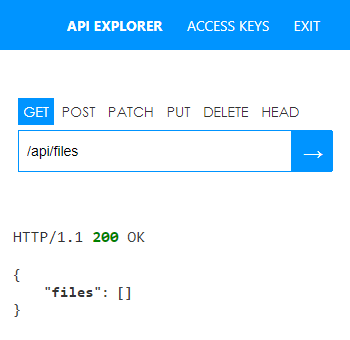
You can also check which files IIS Administration has access to through the API. The end-point is /api/files/ and, if there are no files set up it will show an empty JSON array for the files part of the result.

API Result showing empty files section

Once the files section is added to the appsettings.json file and the Microsoft IIS Administration service is restarted, the API will show which files the API can access.

Populated file section in the IIS Administration API

Finally, if you are having difficulty saving the appsettings.json file, read how to take ownership of a file in order to be able to be able to write to it.

Updates

Updated 14/March/2018: Note to restart the Windows Service; Show what files are available through the API; formatting.

Taking ownership of a file

I’m currently looking at using IIS Administration as a way to automate some deployment tasks. However, the way it got installed, it’s appsettings.json file could not be written to, even when running the text editor as Administrator.

It turns out, SYSTEM had full control of the file, and the installer configured it to only allow me to access the ReST API, yet I needed a deployment script running from the Continuous Delivery server to be able to access IIS Administration, so I needed to modify the settings file, somehow.

To take ownership – The quick guide

So, to take ownership of the appsettings.json file, what I needed was to run two commands at command prompt running as Administrator.

takeown /f "appsettings.json" /a

icacls "appsettings.json" /grant administrators:F /c /l

TAKEOWN

/f [filename] : Specifies the file or directory name, can contain wildcards.

/a : Optional, gives the ownership to the Administrators group, rather than the current user.


ICACLS

/grant [sid]:[permission] : Where sid is the name of the user or group, and [permission] is the permission set, in this case F for “full access”

/C : Indicates to continue on error

/L : Indicates the operation will run on the symbolic link itself, rather than the target of the link.

DDD Scotland final agenda

ddds-unicorn-side-284-086We’ve finalised our agenda and already people have said they’re finding it difficult to decide which sessions to see and which they’ll have to miss out on.

For full information visit ddd.scot. Tickets are available here.

Napier / Doyle Lauder / Heriot Clark Greyfriar
08:30 Registration
09:20 Welcome and housekeeping
09:30 Paul Gillespie
Architecture at Web scale: the good, the bad and the ugly
Keith Kirkhope
A Squad Lead’s tale: the Skyscanner Squads model
Christos Matskas
ASP.NET Core (formerly 5) deep dive
Matt Lacey
Six dimensional mobile user experiences
10:30 Break
10:50 Craig Nicol
Developers are users too : why the user experience of your API sucks
Clarke Ching
Lesstimating: how to fix estimating by doing less of it, not none of it.
Naeem Sarfraz
Windows brings Docker Goodness – What does it mean for .NET developers?
Chris Canal
React for the .Net Developer
11:50 Break
12:10 Raymond Davies
Breaking the monolith
Nathan Gloyn
You keep using the word agile, I do not think it means what you think it means
Gary Ewan Park
Having your Cake, and eating to too!
Don Wibier
Responsive Web Design for Developers
13:10 Lunch
14:25 Sebastien Lambla
Versions are evil – How to do without in your APIs
Chris McDermott
“Ladies and gentlemen, the plane is no longer the problem”
Toby Henderson
Brighter to the Core, moving an OSS project to .Net Core 1.0
Gary Short
Would You Have Survived The Titanic?
15:25 Break
15:45 Max Vasilyev
CQRS and how it can make your architecture better
Richard Dalton & Ashic Mahtab
“Advanced” Functional Programming For The Absolute Beginner
Mike Ritchie
The Code Craftsmanship Thing for the Internet Of Things Thing
Kendall Miller
To The Cloud! How Azure helped us improve the scalability of our SaaS
16:45 Prize draw
17:15 Close

[tickets]

.NET Rocks! is coming to Scotland

Colin Mackay's avatarScottish Developers

Join Carl Franklin and Richard Campbell as they take you on a tour of the broad range of subjects they’ve explored recording more than 1200 episodes of .NET Rocks! over the past 10+ years. The development world today is evolving rapidly, but a look at the history of development can help inform the path we’re on and where we’re going. Along the way you’ll hear some great stories from the various .NET Rocks! episodes and get some ideas of how you can take your career and your company into the future of technology.

dnr-duo-reframed.jpg

They have a three date tour of Scotland coming up in January. More information and tickets can be found here:

Each evening, Carl and Richard will delivery their keynote talk followed by a recording of .NET Rocks with a special guest.

Sponsors

View original post 258 more words

Code Review: Making a drop down list out of an enum

I’ve come across code like this a couple of times and it is rather odd:

IEnumerable<CalendarViewEnum> _calendarViewEnums =
    Enum.GetValues(typeof(CalendarViewEnum)).Cast<CalendarViewEnum>();
List selectList = new List<SelectListItem>();
foreach (CalendarViewEnum calendarViewEnum in _calendarViewEnums)
{
  switch (calendarViewEnum)
  {
    case CalendarViewEnum.FittingRoom:
      selectList.Add(new SelectListItem { 
          Text = AdminPreferencesRes.Label_CalendarViewFittingRoom, 
          Value = ((int)calendarViewEnum).ToString(CultureInfo.InvariantCulture), 
          Selected = (calendarViewEnum == CalendarViewEnum.FittingRoom) 
          });
      break;
    case CalendarViewEnum.Staff:
      selectList.Add(new SelectListItem { 
          Text = AdminPreferencesRes.Label_CalendarViewStaff, 
          Value = ((int)calendarViewEnum).ToString(CultureInfo.InvariantCulture), 
          Selected = (calendarViewEnum == CalendarViewEnum.Staff) 
      });
    break;
    case CalendarViewEnum.List:
      selectList.Add(new SelectListItem { 
          Text = AdminPreferencesRes.Label_CalendarViewList, 
          Value = ((int)calendarViewEnum).ToString(CultureInfo.InvariantCulture), 
          Selected = (calendarViewEnum == CalendarViewEnum.List) 
      });
    break;
    default:
      throw new Exception("CalendarViewEnum Enumeration does not exist");
  }
  return selectList.ToArray();
}

So, what this does is it generates a list of values from an enum, then it loops around that list generating a second list of SelectListItems (for a drop down list box on the UI). Each item consists of a friendly name (to display to the user), a integer value (which is returned to the server on selection) and a Boolean value representing whether that item is selected (which is actually always true, so it is lucky that MVC ignores this the way the Drop Down List was rendered, otherwise it would get very confused.)

Each loop only has one possible path (but the runtime doesn’t know this, so it slavishly runs through the switch statement each time). So that means we can do a lot to optimise and simplify this code.

Here it is:

List<SelectListItem> selectList = new List<SelectListItem>();
selectList.Add(new SelectListItem { 
    Text = AdminPreferencesRes.Label_CalendarViewFittingRoom, 
    Value = ((int) CalendarViewEnum.FittingRoom).ToString(CultureInfo.InvariantCulture) 
  });
selectList.Add(new SelectListItem { 
    Text = AdminPreferencesRes.Label_CalendarViewStaff, 
    Value = ((int)CalendarViewEnum.Staff).ToString(CultureInfo.InvariantCulture) 
  });
selectList.Add(new SelectListItem { 
    Text = AdminPreferencesRes.Label_CalendarViewList, 
    Value = ((int)CalendarViewEnum.List).ToString(CultureInfo.InvariantCulture) 
  });
return selectList.ToArray();

There is one other another bit of refactoring we can do. We always, without exception, return the same things from this method and it is a known fixed size at compile time. So, let’s just generate the array directly:

return new []
{
  new SelectListItem { 
      Text = AdminPreferencesRes.Label_CalendarViewFittingRoom, 
      Value = ((int) CalendarViewEnum.FittingRoom).ToString(CultureInfo.InvariantCulture) 
    },
  new SelectListItem { 
      Text = AdminPreferencesRes.Label_CalendarViewStaff, 
      Value = ((int)CalendarViewEnum.Staff).ToString(CultureInfo.InvariantCulture) 
    },
  new SelectListItem { 
      Text = AdminPreferencesRes.Label_CalendarViewList, 
      Value = ((int)CalendarViewEnum.List).ToString(CultureInfo.InvariantCulture) 
    }
};

So, in the end a redundant loop has been removed and a redundant conversion from list to array has been removed. The code is also easier to read and easier to maintain. It is easier to read because the cyclomatic complexity of the method is now one, previously it was 5 (one for the loop, and one for each case clause in the switch statement [assuming I’ve calculated it correctly]). The lower the cyclomatic complexity of a method is the easier it is to understand and maintain as there are less conditions to deal with. It is easier to maintain because now instead of a whole new case statement to be added to the switch statement a single line just needs to be added to the array. The redundant Selected property has also been removed.

There are still ways to improve this, but the main issue (what that loop is actually doing) for anyone maintaining this code has now been resolved.

Code Review: FirstOrDefault()

I regularly review the code that I maintain. Recently, I’ve come across code like this fairly often:

someCollection.FirstOrDefault().Id

I cannot rightly comprehend why anyone would do this.

FirstOrDefault() returns the first item in a sequence or the default value if it doesn’t exist (i.e. the sequence is empty). For a reference type (classes, basically) the default value is null. So using the value returned by FirstOrDefault() without a null check is only valid for when the sequence contains a value type (e.g. int, decimal, DateTime, Guid, etc.)

In the example above if someCollection is an empty list/array/collection/whatever then FirstOrDefault() will return null and the call to the Id property will fail.

Then you are left with a NullReferenceException on line xxx but you don’t know if it is someCollection, or the returned value from FirstOrDefault() which then wastes your time (or the time of someone else who is having to debug it).

So, if the sequence must always contain items then use First(), in the exceptional event that it is empty the call to First() will throw a more appropriate exception that will help you debug faster. If it is perfectly valid for the sequence to be empty then perform a null check and change the behaviour appropriately.

What a waste of money by Currys (but win for GAME)

As the end of last year, I was at a Microsoft event where we got to see a number of new Microsoft technologies. At this event I got my first chance to have a look at the XBOX 360 Kinect. Since I’m not a gamer I hadn’t paid much attention to what a Kinect was until I actually saw one and had a play on one. Then I instantly wanted one. If you’ve never seen it, even if you are not into computer games, I would highly recommend you have a look.

Anyway, since arriving back home I decided to have a look at getting my hands on one. I’m not a gamer. so I don’t already have an XBOX 360, but since all the options were explained to me I now know exactly what I want. And what I want is an XBOX 360 250Gb HD with the Kinect sensor bar. I know I should be able to get that bundle for somewhere in the region of £300. But I’m looking for a deal. With that in mind I went looking for options. So I searched on Bing and Google.

They both return advertised links (PPC: Pay Per Click) as well as the regular (“organic”) results. So, I click on all most of them opening them in to new tabs. (Remember, I am looking for a deal, so I want to compare quickly what each of the offerings are).

Currys has a paid link with the tag line “Buy Xbox Kinect. We are in stock Reserve and Collect yours Now.” [sic] It sounds promising, doesn’t it? currys-kinect-page

So, I click the link and go looking for the price. Nope can’t see a price.

Some form of Add to Basket link, surely that’ll get me a price. Nope, can’t see that either.

Anything at all that looks remotely like some form or buy/purchase/reserve link. Anything at all! Nope. Not a thing.

I know what I want. I’m motivated to buy. All I want to know is that you’ve got it in stock and how much you want for it.

Well done Currys, you’ve wasted money on advertising a product that I cannot see how to actually buy. I got so irritated that I went to close down the tab in my browser. But… I didn’t do that. I got to thinking about how the follow up from the advert had not served its purpose. The advert hooked me in, but the website was so ineffectual that I was heading off elsewhere.

So, how do I actually buy it? There is no “buy this” call to action, so I really don’t know where to go from here. Any button I press is going to be a bit random and I have to think about what is likely to give me the best route to accomplishing my goal.

I really feel at this point that the website isn’t doing its job properly. Surely the purpose of this website is to get people to buy stuff? That’s how it makes money. That’s why Currys spend money on building the site and advertising its existence. It is so they can get people to come to them to buy stuff rather than go to a competitor to buy stuff.

Lets consider if this had been a situation where I had actually walked in to a Currys store. It would have been akin to me asking a sales assistant on the shop floor “Can you tell me the price of an XBox 360 with 250Gb drive and the Kinect Sensor bar?" and instead of answering my question they wax lyrical about what a great product it is.

I scroll down the page scanning any text for things that look like links or buttons. There are some pictures with “Find out more” links below each of them. Two of them actually have the sensor bar on it, one of which also has the console on it. I actually had to open both links up to figure that out because at scanning speed they look pretty similar. It is only when I’m analysing my actions do I really consciously take in what the difference is.

currys-kinect-findout-moreOnce I get to the correct page I’m presented with a grid of pretty similar looking pictures. At least this time there is a description below each of them and a price (Finally, I’m getting the information I actually wanted). However, my issues with this website are not over. Since there are several similar bundles which vary only slightly from each other by the type of console and by the packaged games. The graphics are too small to see what the difference is in the games and the consoles all look alike I need the text to tell me which is which. The descriptions pretty much all say “MICROSOFT Xbox 360 Came Console with…”, occasionally it will say something else such as “MICROSOFT Xbox 250Gb Bundle with…”

This is not giving me what I want. In fact, Currys are doing themselves a disservice as well. Some of the titles that just say “Xbox 360” without reference to the type of Xbox are actually the 250Gb version, so at a glance I would skip past them because I’ve also seen other descriptions that say “250Gb” so I am assuming it is a lower spec model that I’m not interested in.

Had I not been piqued with interest about the issues with this website I’d have left a long time ago. Instead, I took some time to understand what was actually going on and highlight them.

I’m guessing there was a meeting at some point to discuss the design of the website. At this meeting various aspects of the site were discussed. In the rush to get the site out of the door short cuts were taken. Certain things weren’t thought about properly.

The “Find out more” button actually takes you to a page where you can browse the products relating to the page you’ve just come from. Why not tell me that? I’d have been much more interested if the link had mentioned that I’d see prices, bundle options or what not. Yes, technically I am finding out more, but it didn’t really inspire me to find out more, which is more my point.

The product names in the page that allows you to browse the products are all clipped. I’m guessing that at some point a graphic designer put together the some visuals to show how the page should look. A web developer converts that into a working site. The visuals show two line product names but the developer sees that some product names are too long to match the visuals, so the product names get clipped and thus rendered (in situations were there are very similar product bundles) next to useless. Again, time is probably very tight. An unforeseen situation early in the project has now come to light. There is no time to redesign the visuals so the next best solution is taken. That’s to force the product names into the space provided.

DidI buy from Currys now I spent all that time analysing their site? No. Had an interest in usability not caused me to have a think about what was going on I would have left long before. In the end I bought my XBOX 360 Kinect with 250Gb HDD from GAME… in store! And, you know what? When I was looking in store I couldn’t see an XBOX 360 with 250Gb HD and as I  was searching a sales assistant asked me if she could help. I said I was looking for the version with the 250Gb HDD and she said that they didn’t have any left, however
if I bought the HDD as a separate item at the same time as the XBOX they would discount it so that it was the same total price as buying the model with the 250HDD included. Fantastic! Oh… and they knocked roughly 25% off each of the Kinect games we bought to get going with.